
 1 / 8
1 / 8About Benjamin Font
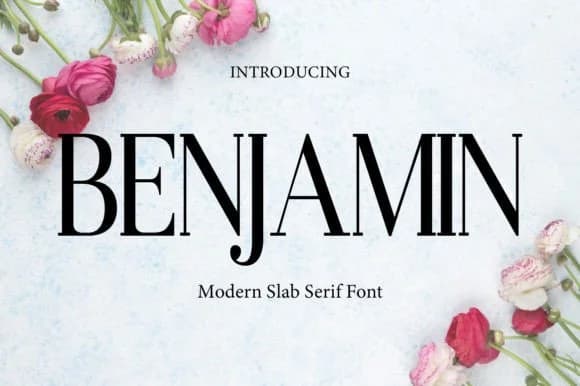
Benjamin is a refined slab serif that carries substantial weight without losing elegance in the letterforms. Designed by gunaloe12, this typeface strikes a careful balance between presence and refinement, making it work equally well for commanding headlines and sophisticated brand applications.
The defining characteristic of Benjamin is how its strong, blocky serifs convey confidence while maintaining warmth and personality. Designers reach for it in luxury fashion branding contexts, creating the visual voice for upscale skincare lines or jewelry collections that need authority. It's equally at home handling film title sequences where sophistication matters, and high-end packaging design for boutique brands looking to stand out on shelves. Magazine cover typography, social media post headers that command attention in busy feeds, and logotypes requiring equal parts presence and clarity all benefit from what Benjamin brings to the table.
Working with Benjamin reveals why it appeals across so many design disciplines. Visual identity systems need exactly this kind of versatility, a typeface that provides presence without harshness and character without compromise. Editorial layouts benefit from the personality it adds, especially when the typography needs to carry its weight as a design element. Complete branding packages, individual covers designed to arrest attention, packaging, and formal documents: Benjamin handles each with confidence and refinement. Access Benjamin on Creative Fabrica to add this capable typeface to your collection.
Style & Use Cases
- Overall Style
- Sturdy, Confident, Logo
- Use Case
- Headlines, Merch
- Ideal For
- vintage posters, logos, and product packaging
- Pairs With
- a light sans-serif
How to Install Benjamin Font
Step-by-step instructions for every platform
- 1Download the Benjamin font file (.ttf or .otf).
- 2Locate the downloaded file in your Downloads folder.
- 3Right-click the font file.
- 4Select "Install" to install for the current user, or "Install for all users" to make it available system-wide.
- 5Benjamin is now available in Word, Photoshop, Illustrator, and all other apps.
More by gunaloe12
View all →
Browse fonts by theme
Curated collections →Saw a font in a picture? Identify any font from an image with our free Font Finder.
More Slab Serif Fonts
Browse all →







What pairs well with Benjamin Font?
Benjamin Font is a slab serif font that shines as a display or heading face. Pair it with a clean sans-serif or serif font for body text — the contrast creates a clear hierarchy while the two styles stay balanced and easy to read.



Benjamin Font
by gunaloe12
Reviewed by the FontBoxDL team · Updated September 2026