 Firefox
 1 / 6
1 / 6About Kinger Vintage Font
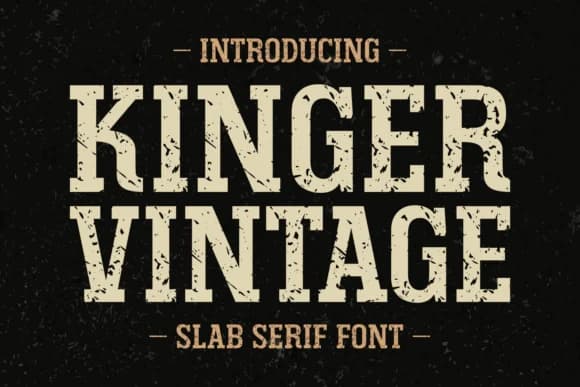
Kinger Vintage, designed by Anto of 7NTypes, channels the raw graphic energy of retro decades through its hefty slab serif forms and distinctly weathered surface texture. The letterforms carry that intentional grunge quality, blocky and solid, with just enough character roughness to feel genuinely aged rather than polished or overly refined.
This typeface delivers serious visual impact on vintage band posters, rustic greeting card suites, and retro book covers where you want immediate typographic weight and presence. Equally strong for apparel branding and vintage product labels, it also shines in magazine headline compositions where you need genuine personality without that overworked feel. The thick, confident stroke weight cuts through visual noise on everything from hand-printed craft labels to custom logotype work. Supporting Eastern European languages alongside a full Latin character set, the font extends easily across international branding projects and multilingual publications.
When your brief calls for that honest, wear-it-well aesthetic rooted in 70s, 80s, and 90s design sensibilities, Kinger Vintage delivers authentic character that feels earned rather than affected. It works best for vintage brand identities, gallery show posters, and multi-volume book series work where real period presence matters most. Head to Creative Fabrica to add this distinctive typeface to your collection.
Style & Use Cases
- Overall Style
- Sturdy, Confident, Slab Serif Fonts
- Use Case
- Headlines, Merch
- Ideal For
- vintage posters, logos, and product packaging
- Pairs With
- a light sans-serif
How to Install Kinger Vintage Font
Step-by-step instructions for every platform
- 1Download the Kinger Vintage font file (.ttf or .otf).
- 2Locate the downloaded file in your Downloads folder.
- 3Right-click the font file.
- 4Select "Install" to install for the current user, or "Install for all users" to make it available system-wide.
- 5Kinger Vintage is now available in Word, Photoshop, Illustrator, and all other apps.
More by Anto (7NTypes)
View all →
Browse fonts by theme
Curated collections →Saw a font in a picture? Identify any font from an image with our free Font Finder.
More Slab Serif Fonts
Browse all →







What pairs well with Kinger Vintage Font?
Kinger Vintage Font is a slab serif font that shines as a display or heading face. Pair it with a clean sans-serif or serif font for body text — the contrast creates a clear hierarchy while the two styles stay balanced and easy to read.



Kinger Vintage Font
Reviewed by the FontBoxDL team · Updated September 2026