 Firefox
 1 / 8
1 / 8About Varsity Class Font
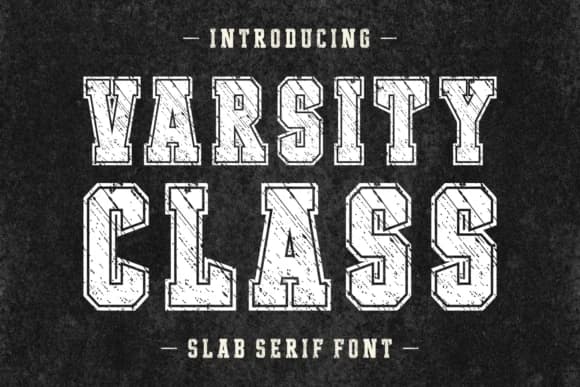
This font hits hard with nostalgic 70s and 80s muscle. Varsity Class, designed by Anto at 7NTypes, is a slab serif that wears its grunge heritage proudly, with thick strokes and a weathered authenticity that reads like a vintage athletic logo or concert poster from decades past.
The weight and texture make it naturally suited to bold applications where subtlety isn't the goal. Think vintage concert posters, retro sports club branding, hardcover book covers with real character, and product labels for small-batch goods or handmade brands. Varsity Class also works well for greeting cards where you need visual impact, DIY screen-printed tees, and even vintage-inspired packaging where the font itself becomes part of the visual story. Its dense letterforms hold up at any size, from large headlines down to secondary text, and it covers Eastern European languages if your audience needs that reach. Visual weight alone carries enough punch that you won't need extra styling tricks or decorative elements to make it work.
Pair it with a sharp, minimal sans-serif for body text to let the slab serif shine without overwhelming the page. You'll find Varsity Class on Creative Fabrica whenever you're ready to add this heavyweight to your design toolkit.
Style & Use Cases
- Overall Style
- Sturdy, Confident, Slab Serif Fonts
- Use Case
- Headlines, Merch
- Ideal For
- vintage posters, logos, and product packaging
- Pairs With
- a light sans-serif
How to Install Varsity Class Font
Step-by-step instructions for every platform
- 1Download the Varsity Class font file (.ttf or .otf).
- 2Locate the downloaded file in your Downloads folder.
- 3Right-click the font file.
- 4Select "Install" to install for the current user, or "Install for all users" to make it available system-wide.
- 5Varsity Class is now available in Word, Photoshop, Illustrator, and all other apps.
More by Anto (7NTypes)
View all →

Browse fonts by theme
Curated collections →Saw a font in a picture? Identify any font from an image with our free Font Finder.
More Slab Serif Fonts
Browse all →







What pairs well with Varsity Class Font?
Varsity Class Font is a slab serif font that shines as a display or heading face. Pair it with a clean sans-serif or serif font for body text — the contrast creates a clear hierarchy while the two styles stay balanced and easy to read.



Varsity Class Font
Reviewed by the FontBoxDL team · Updated August 2026