 Firefox
 1 / 6
1 / 6About Kinger Solid Font
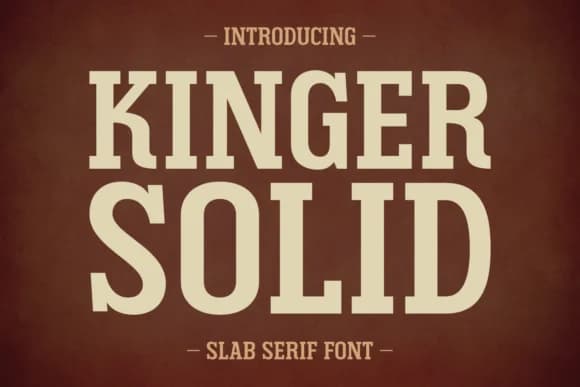
This is a font that feels like stepping into a thrift store at midnight, rough around the edges but undeniably cool. Kinger Solid, designed by Anto of 7NTypes, is a slab serif that captures the raw energy of the 70s, 80s, and 90s all at once. There's nothing clean or corporate about it. The letterforms are thick and confident, with a grunge texture that gives every word an authentic, slightly worn quality.
You'll find it right at home on album artwork and band merchandise, creating that genuine vintage record label aesthetic. Use it for indie bookshop signage that commands attention from passing pedestrians. Bold greeting card suites benefit from this weight when they need personality instead of delicacy. Book covers, especially for memoirs or music journalism, come alive with this typeface. Even T-shirt designs and poster projects get an automatic lift in credibility from its roughness.
The font supports multilingual and Eastern European content, which broadens what you can create. For layout work, Kinger Solid works best paired with a restrained sans-serif for body text, letting this display face do its loud, proud thing. You can find it on Creative Fabrica, ready to anchor your next project with real character.
Style & Use Cases
- Overall Style
- Sturdy, Confident, Slab Serif Fonts
- Use Case
- Headlines, Merch
- Ideal For
- vintage posters, logos, and product packaging
- Pairs With
- a light sans-serif
How to Install Kinger Solid Font
Step-by-step instructions for every platform
- 1Download the Kinger Solid font file (.ttf or .otf).
- 2Locate the downloaded file in your Downloads folder.
- 3Right-click the font file.
- 4Select "Install" to install for the current user, or "Install for all users" to make it available system-wide.
- 5Kinger Solid is now available in Word, Photoshop, Illustrator, and all other apps.
More by Anto (7NTypes)
View all →
Browse fonts by theme
Curated collections →Saw a font in a picture? Identify any font from an image with our free Font Finder.
More Slab Serif Fonts
Browse all →







What pairs well with Kinger Solid Font?
Kinger Solid Font is a slab serif font that shines as a display or heading face. Pair it with a clean sans-serif or serif font for body text — the contrast creates a clear hierarchy while the two styles stay balanced and easy to read.



Kinger Solid Font
Reviewed by the FontBoxDL team · Updated September 2026