 Firefox
 1 / 8
1 / 8About Kibble Font
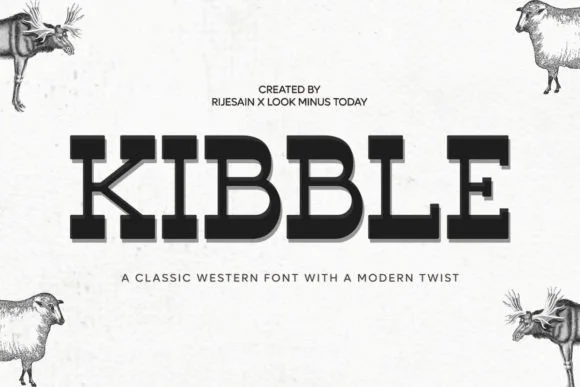
Kibble delivers a raw, weathered energy that channels the Wild West while staying grounded in contemporary design sensibilities. Created by LOOK MINUS TODAY, this slab-serif combines heavy, rough-hewn letterforms with genuine character, producing the kind of typeface that feels built to last and belongs in hands that know their craft.
The font finds its stride on vintage saloon signage, rodeo event posters, Western-themed merchandise graphics, and retro whiskey bottle labels where ruggedness and heritage matter far more than sterile polish and corporate blandness. Old-school tattoo flash sheets, grunge concert flyers, and rustic cabin branding that genuinely leans into unpolished grit are equally natural applications. The substantial letterforms and deliberately weathered texture give every word real impact and presence, ensuring even modest headlines command genuine authority. It captures that frontier aesthetic authentically, not as trendy pastiche; that's what makes it genuinely useful across projects.
A clean, lightweight sans-serif pairs well with Kibble for body copy or supporting text, letting the slab-serif carry the visual weight where it belongs. You'll find it on Creative Fabrica, ready to root your next Western or retro project in honest, uncompromising character.
Style & Use Cases
- Overall Style
- Sturdy, Confident, Western
- Use Case
- Headlines, Merch
- Ideal For
- vintage posters, logos, and product packaging
- Pairs With
- a light sans-serif
How to Install Kibble Font
Step-by-step instructions for every platform
- 1Download the Kibble font file (.ttf or .otf).
- 2Locate the downloaded file in your Downloads folder.
- 3Right-click the font file.
- 4Select "Install" to install for the current user, or "Install for all users" to make it available system-wide.
- 5Kibble is now available in Word, Photoshop, Illustrator, and all other apps.
Browse fonts by theme
Curated collections →Saw a font in a picture? Identify any font from an image with our free Font Finder.
More Slab Serif Fonts
Browse all →







What pairs well with Kibble Font?
Kibble Font is a slab serif font that shines as a display or heading face. Pair it with a clean sans-serif or serif font for body text — the contrast creates a clear hierarchy while the two styles stay balanced and easy to read.




Kibble Font
Reviewed by the FontBoxDL team · Updated September 2026