
 1 / 8
1 / 8About Key Doodle Font
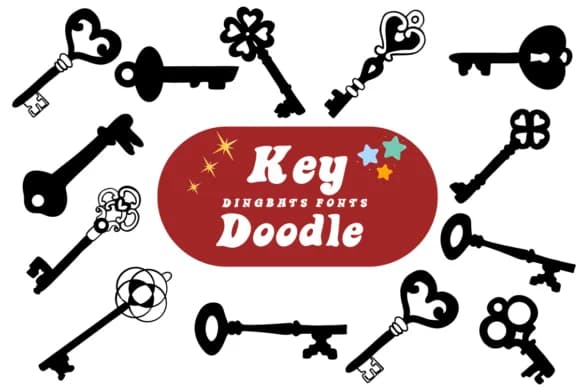
You're designing a speakeasy-themed party invitation when you realize you actually need illustration icons that feel both playful and authentically vintage. Key Doodle, created by designer Suphitchaya, is a dingbat font loaded with hand-drawn key and lock imagery perfectly suited for this moment. The glyphs fit naturally across mystery card game covers, escape room poster systems, indie app security interfaces, personalized password manager branding, secret-themed wedding invitations, and treasure hunt event materials. Each character captures that rich balance between nostalgic illustration quality and contemporary design sensibility that prevents the work from feeling kitschy or outdated.
The real strength emerges when you need both strong display impact and genuine functional flexibility. You get multiple key variations and decorative lock symbols that layer naturally into compositions without overwhelming the layout. It performs equally well in boutique stationery suites where the keys function as visual anchors and signature elements, and in digital product interfaces where they serve as UI ornaments. The outlines render with enough clarity that you can add custom color fills if you want to match specific brand palettes.
Grab Key Doodle from Creative Fabrica and add this playful visual dimension to your next mystery, security-themed, or treasure-hunt design project.
Style & Use Cases
- Overall Style
- Iconographic, Fonts
- Use Case
- Icons, Accents
- Ideal For
- ornaments, bullets, and decorative flourishes
- Pairs With
- any text font
How to Install Key Doodle Font
Step-by-step instructions for every platform
- 1Download the Key Doodle font file (.ttf or .otf).
- 2Locate the downloaded file in your Downloads folder.
- 3Right-click the font file.
- 4Select "Install" to install for the current user, or "Install for all users" to make it available system-wide.
- 5Key Doodle is now available in Word, Photoshop, Illustrator, and all other apps.
More by Suphitchaya
View all →

Browse fonts by theme
Curated collections →Saw a font in a picture? Identify any font from an image with our free Font Finder.
More Dingbats Fonts
Browse all →







What pairs well with Key Doodle Font?
Key Doodle Font is a versatile dingbats font that works for both headings and body text. Pair it with a contrasting sans-serif or serif font to add visual interest and a clear distinction between titles and body copy.



Key Doodle Font
by Suphitchaya
Reviewed by the FontBoxDL team · Updated June 2026