 Firefox
 1 / 8
1 / 8About Kawaii Display Font
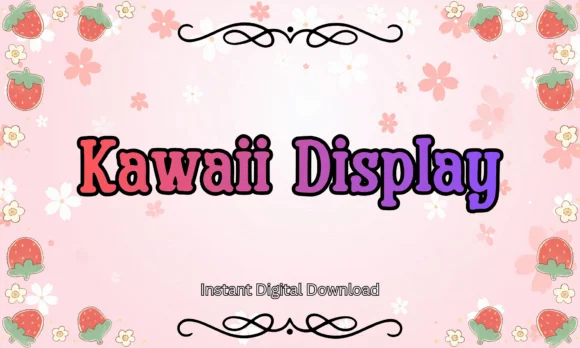
Kawaii Display by Pamlico Creations brings that distinctive rounded, bubbly character that makes any design feel immediately warm and approachable. The slab-serif letterforms combine structured strokes with soft, rounded curves, creating letters that read as both substantial and surprisingly gentle. You get that chunky, puffy aesthetic without sacrificing legibility, especially at display sizes where this font truly shines.
This typeface handles specific projects beautifully. Planner stickers and page dividers become instant favorites with their cheerful presence, while kids' birthday invitation suites gain genuine charm and visual personality. Small businesses rely on it for adorable merchandise tags and cute product labels that actually stand out on shelves. Scrapbooking layouts come alive with its friendly stroke weight, and greeting cards paired with pastel illustrations feel cohesive and intentional. The font arrives in both TTF and OTF formats, offering reliable compatibility across major design platforms and software.
Best suited to anyone creating youth-focused branding, playful packaging, or designs with a handmade aesthetic, Kawaii Display delivers unmistakable personality across every letter. You'll find it on Creative Fabrica, ready to download whenever you need a font that's actually cute, not just trying to be.
Style & Use Cases
- Overall Style
- Sturdy, Confident, Kawaii Font
- Use Case
- Headlines, Merch
- Ideal For
- vintage posters, logos, and product packaging
- Pairs With
- a light sans-serif
How to Install Kawaii Display Font
Step-by-step instructions for every platform
- 1Download the Kawaii Display font file (.ttf or .otf).
- 2Locate the downloaded file in your Downloads folder.
- 3Right-click the font file.
- 4Select "Install" to install for the current user, or "Install for all users" to make it available system-wide.
- 5Kawaii Display is now available in Word, Photoshop, Illustrator, and all other apps.
Browse fonts by theme
Curated collections →Saw a font in a picture? Identify any font from an image with our free Font Finder.
More Slab Serif Fonts
Browse all →







What pairs well with Kawaii Display Font?
Kawaii Display Font is a slab serif font that shines as a display or heading face. Pair it with a clean sans-serif or serif font for body text — the contrast creates a clear hierarchy while the two styles stay balanced and easy to read.




Kawaii Display Font
Reviewed by the FontBoxDL team · Updated August 2026