 Firefox
 1 / 8
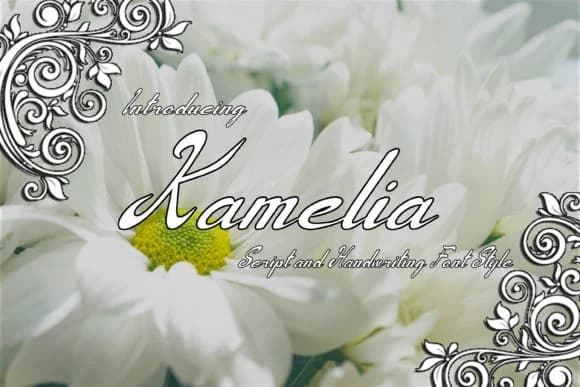
1 / 8About Kamelia Font by F2 Gallery Font
You're designing wedding invitations and need something that feels genuinely handwritten, not mass-produced. Kamelia Font from F2 Gallery gives you precisely that: organic letterforms with the polish that separates professional work from amateur attempts. This script typeface shines across the projects that demand a personal touch: engagement announcements and printed stationery suites, personalized thank-you cards you'll want to frame, monogrammed product labels for boutique goods, and custom gift tags that feel like someone actually took time with them.
The letterforms maintain a natural flow even at large display sizes, so you can build entire invitation suites around it without worrying about legibility. It captures that hand-lettered quality that clients recognize and remember, but without the inconsistency that makes purely handwritten sources difficult to work with at scale. The curves feel organic without being chaotic, which is where most script fonts either overestimate or underestimate themselves. Pair it with a clean serif or sans-serif for body copy if you want layering options, but the letterforms hold their own even as a standalone header font.
Grab Kamelia from Creative Fabrica and add it to your collection. It's the kind of font you'll keep reaching for once you know what it can do.
Style & Use Cases
- Overall Style
- Elegant, Flowing, Kamelia
- Use Case
- Invitations, Branding
- Ideal For
- wedding stationery, greeting cards, and signatures
- Pairs With
- a simple uppercase sans
How to Install Kamelia Font by F2 Gallery Font
Step-by-step instructions for every platform
- 1Download the Kamelia Font by F2 Gallery font file (.ttf or .otf).
- 2Locate the downloaded file in your Downloads folder.
- 3Right-click the font file.
- 4Select "Install" to install for the current user, or "Install for all users" to make it available system-wide.
- 5Kamelia Font by F2 Gallery is now available in Word, Photoshop, Illustrator, and all other apps.
More by F2 Gallery
View all →

Browse fonts by theme
Curated collections →Saw a font in a picture? Identify any font from an image with our free Font Finder.
More Script Handwritten Fonts
Browse all →







What pairs well with Kamelia Font by F2 Gallery Font?
Kamelia Font by F2 Gallery Font is a script font that shines as a display or heading face. Pair it with a clean sans-serif or serif font for body text — the contrast creates a clear hierarchy while the two styles stay balanced and easy to read.



Kamelia Font by F2 Gallery Font
by F2 Gallery
Reviewed by the FontBoxDL team · Updated August 2026