 Firefox
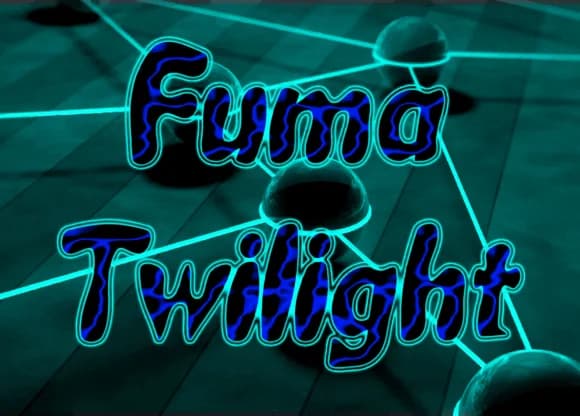
About Fuma Twilight Font
Fuma Twilight by F2 Gallery is an expressive and contemporary script font that brings character and movement to modern designs. With its fluid letterforms and dynamic strokes, it captures the energy of hand-lettered type while maintaining excellent readability across both digital and print applications.
This versatile typeface excels at bringing casual, modern energy to gaming logos and esports branding, where bold stroke variations command immediate attention. It works beautifully for comic book lettering and graphic novel covers, where personality and movement are absolutely essential. The font also shines in creating custom t-shirt designs with character and charm, whether for indie apparel brands or personal creative projects. Game developers and designers creating podcast artwork will particularly appreciate how Fuma Twilight maintains its distinctive personality while remaining legible at smaller sizes.
The font's natural handwriting aesthetic makes it an excellent choice for brands seeking authentic character without sacrificing professional polish. Its dynamic nature maintains strong functionality across promotional materials and brand applications where you need to stand out. Whether you're designing merchandise graphics, event posters, or comprehensive digital branding assets, Fuma Twilight delivers the character-driven approach contemporary audiences expect. Get Fuma Twilight on Creative Fabrica and add this distinctive script to your font collection.
Style & Use Cases
- Overall Style
- Elegant, Flowing, Fuma Twilight
- Use Case
- Invitations, Branding
- Ideal For
- wedding stationery, greeting cards, and signatures
- Pairs With
- a simple uppercase sans
How to Install Fuma Twilight Font Font
Step-by-step instructions for every platform
- 1Download the Fuma Twilight Font font file (.ttf or .otf).
- 2Locate the downloaded file in your Downloads folder.
- 3Right-click the font file.
- 4Select "Install" to install for the current user, or "Install for all users" to make it available system-wide.
- 5Fuma Twilight Font is now available in Word, Photoshop, Illustrator, and all other apps.



Browse fonts by theme
Curated collections →Saw a font in a picture? Identify any font from an image with our free Font Finder.
More Script Handwritten Fonts
Browse all →







What pairs well with Fuma Twilight Font?
Fuma Twilight Font is a script font that shines as a display or heading face. Pair it with a clean sans-serif or serif font for body text — the contrast creates a clear hierarchy while the two styles stay balanced and easy to read.



Fuma Twilight Font
by F2 Gallery
Reviewed by the FontBoxDL team · Updated May 2026