
 1 / 5
1 / 5About Junggle Leaves Font
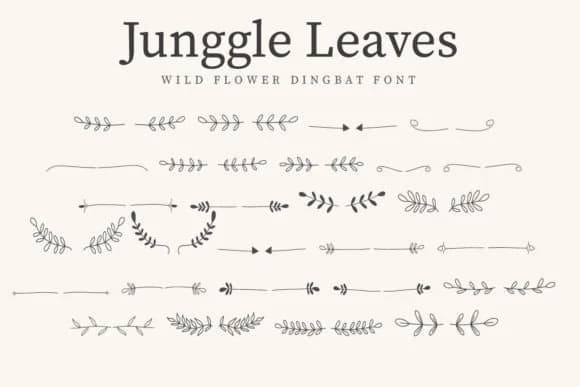
Picture yourself designing a wedding invitation suite, carefully searching for botanical decorative elements that feel intentional and natural rather than pulled from a generic clip art library. You discover Junggle Leaves, a dingbat typeface from CraftedType Studio built specifically around plant forms, leaves, and organic shapes. The typeface delivers exactly what most designers need in that moment: genuine character and visual interest without aesthetic compromise.
This font works across several practical contexts. Wedding invitation suites benefit from the botanical symbolism most obviously, but the extensive library of leaf and vine forms serves other design work equally well: boutique skincare and natural product packaging, DIY craft event signage with botanical themes, scrapbooking layouts where texture and visual interest matter, and Cricut-based cutting projects. The bold weight translates clearly: use it large for decorative text on signs, or scale it down for sticker sheets and product labels. Each individual symbol carries enough visual refinement to function as a standalone graphic or layer into background textures and patterns without losing its own distinctive character and definition.
You'll find Junggle Leaves available on Creative Fabrica, ready to integrate botanical precision and visual character into your next design project.
Style & Use Cases
- Overall Style
- Iconographic, Sticker Fonts
- Use Case
- Icons, Accents
- Ideal For
- ornaments, bullets, and decorative flourishes
- Pairs With
- any text font
How to Install Junggle Leaves Font
Step-by-step instructions for every platform
- 1Download the Junggle Leaves font file (.ttf or .otf).
- 2Locate the downloaded file in your Downloads folder.
- 3Right-click the font file.
- 4Select "Install" to install for the current user, or "Install for all users" to make it available system-wide.
- 5Junggle Leaves is now available in Word, Photoshop, Illustrator, and all other apps.
More by CraftedType Studio
View all →



Browse fonts by theme
Curated collections →Saw a font in a picture? Identify any font from an image with our free Font Finder.
More Dingbats Fonts
Browse all →







What pairs well with Junggle Leaves Font?
Junggle Leaves Font is a versatile dingbats font that works for both headings and body text. Pair it with a contrasting sans-serif or serif font to add visual interest and a clear distinction between titles and body copy.



Junggle Leaves Font
Reviewed by the FontBoxDL team · Updated July 2026