
 1 / 8
1 / 8About Jellyfish Doodle Font
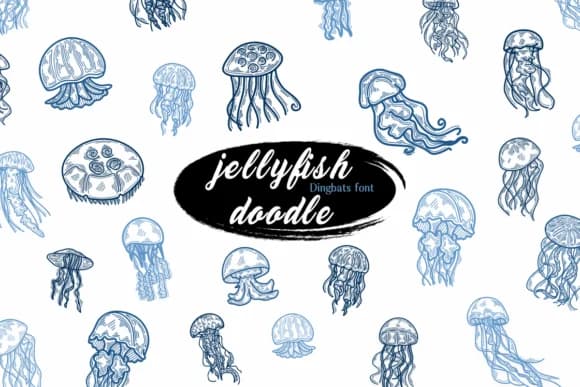
Jellyfish Doodle by Suphitchaya is a whimsical dingbat collection packed with hand-drawn underwater creatures and aquatic elements. This font delivers a complete set of ocean-themed ornaments and illustrations in one typeface, making it faster to build custom designs without sourcing separate graphic files.
Nautical wedding invitation suites benefit immediately from the jellyfish and sea creature details, which add visual interest without overwhelming surrounding text. Scrapbooking layouts centered on aquatic or ocean themes gain access to a full library of ready-made elements you can layer directly into your page designs. Children's picture books with underwater settings, greeting cards featuring an aquarium aesthetic, and DIY tags for beach-inspired or marine product labels all become considerably easier to execute when your dingbat set already contains the visual language you need.
Since this is a dingbat font, you access the creatures and decorative elements through your keyboard, eliminating the workflow friction of importing multiple separate graphics. The structured collection gives you a cohesive visual direction right out of the box. Grab Jellyfish Doodle on Creative Fabrica and start adding whimsical underwater charm to your next project.
Style & Use Cases
- Overall Style
- Iconographic, Aquatic
- Use Case
- Icons, Accents
- Ideal For
- ornaments, bullets, and decorative flourishes
- Pairs With
- any text font
How to Install Jellyfish Doodle Font
Step-by-step instructions for every platform
- 1Download the Jellyfish Doodle font file (.ttf or .otf).
- 2Locate the downloaded file in your Downloads folder.
- 3Right-click the font file.
- 4Select "Install" to install for the current user, or "Install for all users" to make it available system-wide.
- 5Jellyfish Doodle is now available in Word, Photoshop, Illustrator, and all other apps.
More by Suphitchaya
View all →

Browse fonts by theme
Curated collections →Saw a font in a picture? Identify any font from an image with our free Font Finder.
More Dingbats Fonts
Browse all →







What pairs well with Jellyfish Doodle Font?
Jellyfish Doodle Font is a versatile dingbats font that works for both headings and body text. Pair it with a contrasting sans-serif or serif font to add visual interest and a clear distinction between titles and body copy.



Jellyfish Doodle Font
by Suphitchaya
Reviewed by the FontBoxDL team · Updated July 2026