
 1 / 10
About Ironia Font
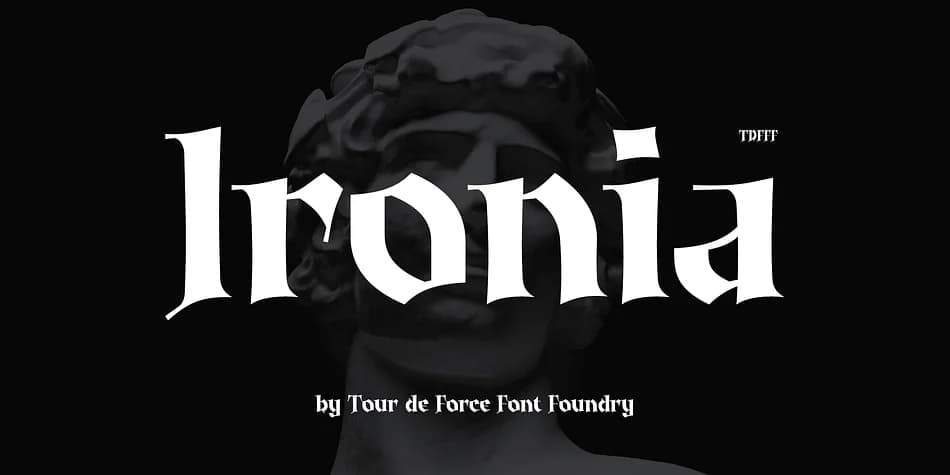
Ironia by Tour de Force Font Foundry is a modern blackletter typeface built for visual impact rather than slavish adherence to historical precision. The typeface channels the authentic weight and presence of medieval typography while stripping away the ornamental complexity that often makes period-accurate blackletter difficult to read in practical design applications. You get the drama and formality of old-world letterforms paired with genuine legibility, allowing words to hit hard on the page without forcing readers to struggle through dense ornamentation or lose the underlying message entirely.
Extended Latin support makes Ironia suitable for European projects and multi-regional work across different languages and regions. Deploy it for gothic-themed wedding invitation suites, vintage product labels that need genuine character and handmade aesthetic, fantasy novel covers demanding visual authority and presence, event posters where immediate visual impact drives the entire design strategy, and specialty restaurant menus where tradition and formality matter most. It also works for formal certificates, restaurant branding projects, packaging designs for artisanal or niche-market products, and any application where commanding visual weight genuinely enhances the underlying message and story.
Grab Ironia on Creative Fabrica and add some real blackletter presence to your next project.
Style & Use Cases
- Overall Style
- Ornate, Gothic
- Use Case
- Logos, Certificates
- Ideal For
- medieval themes, band merch, and tattoo lettering
- Pairs With
- a clean sans-serif for body text
How to Install Ironia Font
Step-by-step instructions for every platform
- 1Download the Ironia font file (.ttf or .otf).
- 2Locate the downloaded file in your Downloads folder.
- 3Right-click the font file.
- 4Select "Install" to install for the current user, or "Install for all users" to make it available system-wide.
- 5Ironia is now available in Word, Photoshop, Illustrator, and all other apps.
More by Tour de Force Font Foundry
View all →
Browse fonts by theme
Curated collections →Saw a font in a picture? Identify any font from an image with our free Font Finder.
More Blackletter Fonts
Browse all →







What pairs well with Ironia Font?
Ironia Font is a blackletter font that shines as a display or heading face. Pair it with a clean serif or sans-serif font for body text — the contrast creates a clear hierarchy while the two styles stay balanced and easy to read.



Ironia Font
Reviewed by the FontBoxDL team · Updated June 2026