 Firefox
 1 / 3
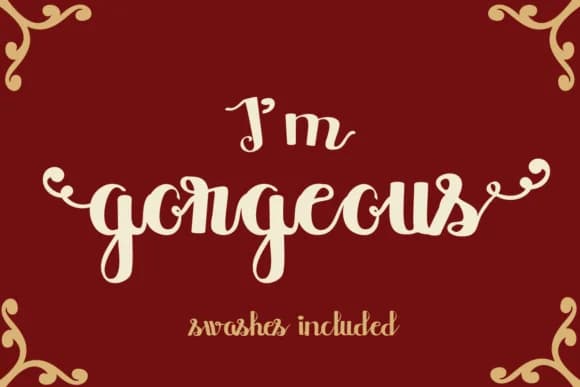
1 / 3About I'm Gorgeous Font
I'm Gorgeous Font by Lickable Pixels is a bold handwritten script that infuses designs with personality and expressive character. The font features decorative start and end swashes that add dynamic movement and charm, making it particularly well-suited for wedding invitation suites, luxury cosmetic brand packaging, artisanal product labeling, and personalized greeting cards. These flourishes provide designers with creative flexibility, whether working at larger display sizes or as subtle accents throughout a composition. Handwritten scripts like this thrive in projects where authenticity and personality take precedence over strict formality. Whether you're designing beauty product packaging with a boutique aesthetic, creating sophisticated wedding stationery, crafting custom DIY craft labels, or producing handmade greeting cards for specialty retailers, the dynamic letterforms ensure your message resonates with genuine warmth and engaging energy. The swashes adapt easily to different design contexts, they can be layered for maximum visual impact or used selectively for refined sophistication, depending on your specific project requirements and brand aesthetic. The versatility of this script makes it equally at home on packaging, invitations, social media graphics, and hand-drawn branding projects. Its bold weight ensures excellent legibility even at smaller sizes while maintaining that coveted handmade quality throughout. Get I'm Gorgeous Font on Creative Fabrica and add this charming script to your design toolkit.
Style & Use Cases
- Overall Style
- Elegant, Flowing, I Am Gorgeous
- Use Case
- Invitations, Branding
- Ideal For
- wedding stationery, greeting cards, and signatures
- Pairs With
- a simple uppercase sans
How to Install I'm Gorgeous Font Font
Step-by-step instructions for every platform
- 1Download the I'm Gorgeous Font font file (.ttf or .otf).
- 2Locate the downloaded file in your Downloads folder.
- 3Right-click the font file.
- 4Select "Install" to install for the current user, or "Install for all users" to make it available system-wide.
- 5I'm Gorgeous Font is now available in Word, Photoshop, Illustrator, and all other apps.
More by Lickable Pixels
View all →
Browse fonts by theme
Curated collections →Saw a font in a picture? Identify any font from an image with our free Font Finder.
More Script Handwritten Fonts
Browse all →







What pairs well with I'm Gorgeous Font?
I'm Gorgeous Font is a script font that shines as a display or heading face. Pair it with a clean sans-serif or serif font for body text — the contrast creates a clear hierarchy while the two styles stay balanced and easy to read.



I'm Gorgeous Font
Reviewed by the FontBoxDL team · Updated May 2026