
 1 / 8
1 / 8About Hibiscus Doodle Font
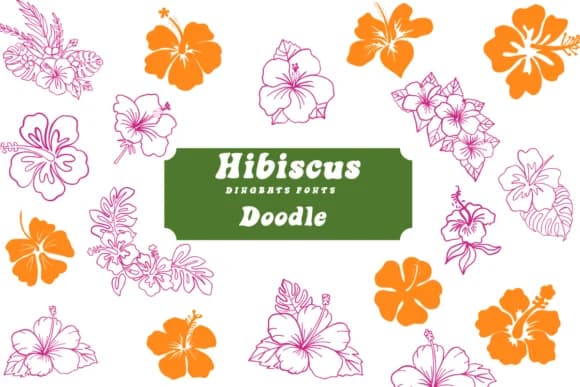
You're laying out a wedding invitation suite, and you need florals that feel hand-drawn instead of sourced from a clip art library. Hibiscus Doodle, designed by Suphitchaya, is a dingbats font of sketchy botanical illustrations that bring real personality to your lettering without stealing focus from your text.
This is a working tool for anyone doing ornamental design work. Hand-lettered greeting cards are where this font shines, with florals framing your message and giving the whole piece a sketch-like warmth. Recipe cards benefit too, especially when you're going for that garden journal aesthetic where pencil drawings feel more honest than digital graphics. Scrapbooking layouts give you a full library of line-drawn blooms and leaves that actually feel cohesive rather than randomly gathered. You'll also find it useful for tote bag designs, botanical art print layouts, plant-themed product packaging labels, and even DIY nursery wall decals where the casual sketch style matches the subject matter far better than polished florals would.
The font performs equally well at large display sizes and small supporting roles throughout your layout. You get both OTF and TTF versions, making it compatible with Procreate, Affinity Designer, and other creative software. Pick it up on Creative Fabrica and start using hand-drawn flowers as your design foundation.
Style & Use Cases
- Overall Style
- Iconographic, Fonts
- Use Case
- Icons, Accents
- Ideal For
- ornaments, bullets, and decorative flourishes
- Pairs With
- any text font
How to Install Hibiscus Doodle Font
Step-by-step instructions for every platform
- 1Download the Hibiscus Doodle font file (.ttf or .otf).
- 2Locate the downloaded file in your Downloads folder.
- 3Right-click the font file.
- 4Select "Install" to install for the current user, or "Install for all users" to make it available system-wide.
- 5Hibiscus Doodle is now available in Word, Photoshop, Illustrator, and all other apps.
More by Suphitchaya
View all →
Browse fonts by theme
Curated collections →Saw a font in a picture? Identify any font from an image with our free Font Finder.
More Dingbats Fonts
Browse all →







What pairs well with Hibiscus Doodle Font?
Hibiscus Doodle Font is a versatile dingbats font that works for both headings and body text. Pair it with a contrasting sans-serif or serif font to add visual interest and a clear distinction between titles and body copy.



Hibiscus Doodle Font
by Suphitchaya
Reviewed by the FontBoxDL team · Updated June 2026