
 1 / 3
1 / 3About Henry VII Font
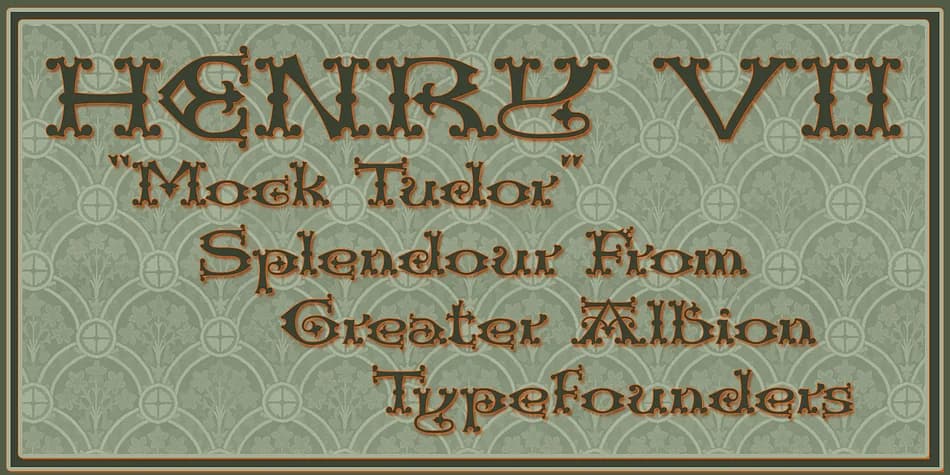
This font channels old-world pageantry with just enough playfulness to feel warm and approachable rather than purely austere. Henry VII, designed by Greater Albion Typefounders, draws its character from a Westminster Abbey inscription commemorating the Tudor monarch. What began as capital letters only was reimagined as a full character set, giving the typeface a thoughtful mock-Tudor quality that honors its historical roots while remaining practical for contemporary design.
The typeface thrives in contexts where historical weight and formality matter. Wedding invitation suites benefit from its ceremonial grace, as do heritage menu designs for pubs and taverns seeking authentic period atmosphere. It works beautifully for museum and historical society materials, genealogical documents, and hand-lettered botanical or apothecary labels that reference centuries-old traditions. The blackletter structure commands attention without pretension, making it equally suitable for designers chasing period flavor in modern work and those restoring genuinely historical projects.
Pair Henry VII with a clean, restrained sans-serif for body text in longer passages, letting the blackletter command the visual hierarchy where it counts most. The contrast keeps pages readable while the Tudor character remains the focal point. You'll find it on Creative Fabrica, ready to bring that ceremonial English gravitas to your next project.
Style & Use Cases
- Overall Style
- Ornate, Gothic
- Use Case
- Logos, Certificates
- Ideal For
- medieval themes, band merch, and tattoo lettering
- Pairs With
- a clean sans-serif for body text
How to Install Henry VII Font
Step-by-step instructions for every platform
- 1Download the Henry VII font file (.ttf or .otf).
- 2Locate the downloaded file in your Downloads folder.
- 3Right-click the font file.
- 4Select "Install" to install for the current user, or "Install for all users" to make it available system-wide.
- 5Henry VII is now available in Word, Photoshop, Illustrator, and all other apps.
More by Greater Albion Typefounders
View all →

Browse fonts by theme
Curated collections →Saw a font in a picture? Identify any font from an image with our free Font Finder.
More Blackletter Fonts
Browse all →







What pairs well with Henry VII Font?
Henry VII Font is a blackletter font that shines as a display or heading face. Pair it with a clean serif or sans-serif font for body text — the contrast creates a clear hierarchy while the two styles stay balanced and easy to read.



Henry VII Font
by Greater Albion Typefounders
Reviewed by the FontBoxDL team · Updated June 2026