 Firefox
 1 / 6
1 / 6About Hazard Island Font
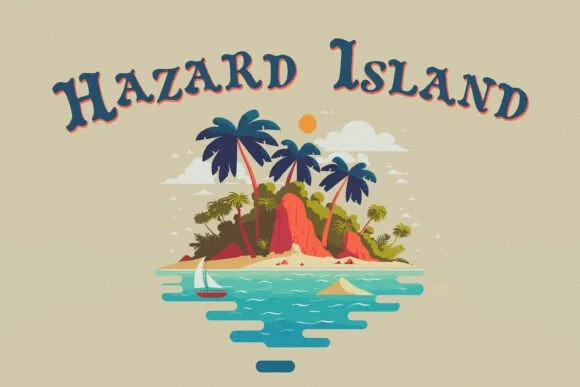
Hazard Island by HG Designs is a slab-serif with a vintage carnival edge and a playful bounce that recalls old-school pirate posters. The offset letterpress quality gives each character a slight, intentional irregularity that reads as handcrafted rather than digital, with good legibility across different sizes.
This typeface works beautifully for sublimation projects on mugs, t-shirts, and drinkware where retro charm matters. DIY wall art fits perfectly here too, especially for cottage aesthetics and vintage-themed rooms that benefit from that strong presence. Handmade product labels shine with Hazard Island: vintage apothecary jars, antique market tags, artisan soap packaging, and craft store signage all feel more intentional with this typeface. Digital scrapbooking layouts get genuine personality from its letterforms, and the font handles Cricut cutting projects with enough visual weight to read clearly at smaller scales.
What makes this useful beyond niche craft work is how well it straddles readable and distinctive. Event posters, quirky branding projects, and retro-inspired packaging all benefit from that old-school handcrafted feeling. The offset aesthetic taps into revival design trends without feeling derivative. Grab Hazard Island on Creative Fabrica and add this vintage character to your next project.
Style & Use Cases
- Overall Style
- Sturdy, Confident, Hazard Island
- Use Case
- Headlines, Merch
- Ideal For
- vintage posters, logos, and product packaging
- Pairs With
- a light sans-serif
How to Install Hazard Island Font
Step-by-step instructions for every platform
- 1Download the Hazard Island font file (.ttf or .otf).
- 2Locate the downloaded file in your Downloads folder.
- 3Right-click the font file.
- 4Select "Install" to install for the current user, or "Install for all users" to make it available system-wide.
- 5Hazard Island is now available in Word, Photoshop, Illustrator, and all other apps.
Browse fonts by theme
Curated collections →Saw a font in a picture? Identify any font from an image with our free Font Finder.
More Slab Serif Fonts
Browse all →







What pairs well with Hazard Island Font?
Hazard Island Font is a slab serif font that shines as a display or heading face. Pair it with a clean sans-serif or serif font for body text — the contrast creates a clear hierarchy while the two styles stay balanced and easy to read.




Hazard Island Font
by HG Designs
Reviewed by the FontBoxDL team · Updated August 2026