 Firefox
 1 / 7
1 / 7About Groutpix Font
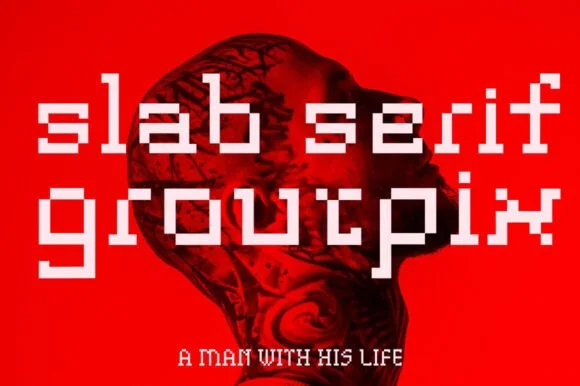
Groutpix is a geometric slab serif that channels digital-age minimalism with a surprising amount of warmth. Designed by ffeeaarr, this typeface sits at the intersection of technical precision and organic friendliness, making it instantly recognizable while remaining legible at any size. The blocky serifs and structured letterforms give it a distinctly futuristic edge, though the rounded terminals keep things approachable rather than cold or mechanical. This balance between hard geometry and human warmth is what sets it apart.
This font excels in tech startup decks, neon-style brand identities, sci-fi movie posters, and retro-futuristic album covers. It handles headlines without fatigue and reads with surprising clarity at display sizes. The geometric proportions make it particularly effective for app interfaces and UI design where visual rhythm and letter consistency matter, but it's equally at home on editorial spreads and promotional materials demanding a contemporary, almost robotic personality. The modular construction of each character gives compositions a built, engineered quality that commands immediate attention.
Use Groutpix for tech companies, gaming studios, speculative fiction projects, or any brand wanting to feel forward-thinking without sacrificing legibility. The typeface speaks a language of innovation and precision that digital-first audiences understand immediately. Find it on Creative Fabrica and start building something that looks like the future.
Style & Use Cases
- Overall Style
- Sturdy, Confident, Poster
- Use Case
- Headlines, Merch
- Ideal For
- vintage posters, logos, and product packaging
- Pairs With
- a light sans-serif
How to Install Groutpix Font
Step-by-step instructions for every platform
- 1Download the Groutpix font file (.ttf or .otf).
- 2Locate the downloaded file in your Downloads folder.
- 3Right-click the font file.
- 4Select "Install" to install for the current user, or "Install for all users" to make it available system-wide.
- 5Groutpix is now available in Word, Photoshop, Illustrator, and all other apps.
More by ffeeaarr
View all →

Browse fonts by theme
Curated collections →Saw a font in a picture? Identify any font from an image with our free Font Finder.
More Slab Serif Fonts
Browse all →







What pairs well with Groutpix Font?
Groutpix Font is a slab serif font that shines as a display or heading face. Pair it with a clean sans-serif or serif font for body text — the contrast creates a clear hierarchy while the two styles stay balanced and easy to read.




Groutpix Font
by ffeeaarr
Reviewed by the FontBoxDL team · Updated August 2026