
 1 / 5
1 / 5About Graduation Divider Font
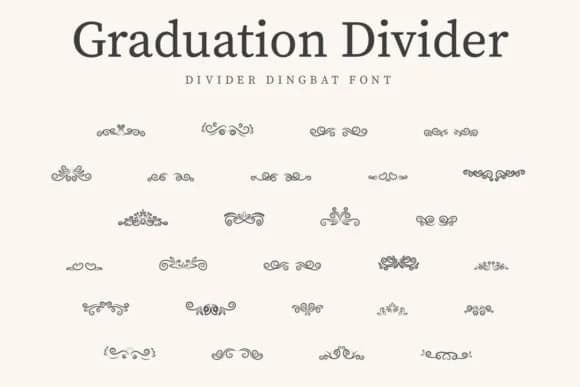
You're laying out a wedding invitation and you need ornamental dividers that read both formal and handcrafted. Graduation Divider by CraftedType Studio is a dingbat font built specifically for this kind of decorative work. The vintage aesthetic plays well with layered borders on formal stationery, scrapbook page breaks, vintage-style graduation programs, and retro event cards where you want typographic ornaments to anchor the layout without feeling overdone or out of place.
This font excels when you're building visual separation between sections or adding typographic weight to a design composition. Wedding invitation suites, anniversary card projects, greeting card embellishments, and DIY scrapbook layouts all benefit from having a curated set of decorative characters that feel intentional rather than pulled from a generic library. Beyond traditional craft applications, it works well for packaging design, label work, and any project where vintage ornamentation needs to enhance the visual hierarchy. The ornaments maintain their clarity and presence even at larger sizes, so you can feature them as primary design elements without overwhelming the composition or competing with your main content.
Graduation Divider from CraftedType Studio offers a full range of dingbat characters designed to complement vintage or formal design directions. Available on Creative Fabrica, you'll find everything you need to add typographic flourish with restraint to your next project.
Style & Use Cases
- Overall Style
- Iconographic, Graduation Divider
- Use Case
- Icons, Accents
- Ideal For
- ornaments, bullets, and decorative flourishes
- Pairs With
- any text font
How to Install Graduation Divider Font
Step-by-step instructions for every platform
- 1Download the Graduation Divider font file (.ttf or .otf).
- 2Locate the downloaded file in your Downloads folder.
- 3Right-click the font file.
- 4Select "Install" to install for the current user, or "Install for all users" to make it available system-wide.
- 5Graduation Divider is now available in Word, Photoshop, Illustrator, and all other apps.
More by CraftedType Studio
View all →



Browse fonts by theme
Curated collections →Saw a font in a picture? Identify any font from an image with our free Font Finder.
More Dingbats Fonts
Browse all →







What pairs well with Graduation Divider Font?
Graduation Divider Font is a versatile dingbats font that works for both headings and body text. Pair it with a contrasting sans-serif or serif font to add visual interest and a clear distinction between titles and body copy.



Graduation Divider Font
Reviewed by the FontBoxDL team · Updated July 2026