 Firefox
 1 / 5
1 / 5About Gerbera Font
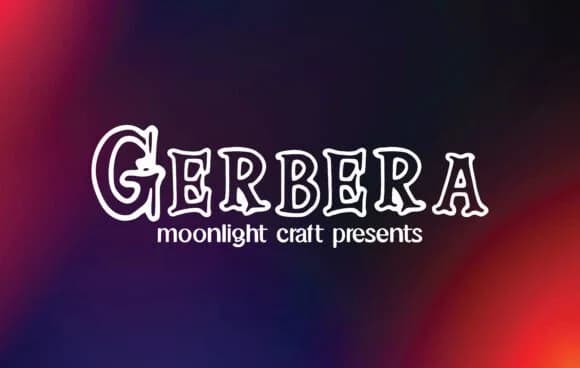
It's warm and bold at the same time, with real visual presence that makes you want to use it. Gerbera, designed by moonlight craft, is a slab-serif typeface that bridges retro character and contemporary edge, delivering strong headline impact and surprising legibility in body text when the design calls for it.
Chunky, substantial serifs give this font real backbone. It's equally at home on craft brewery labels and artisan soap packaging as it is anchoring editorial feature spreads or commanding website hero sections. Indie bookstore signage feels natural in Gerbera, as do podcast cover designs and vintage restaurant menu layouts. The typeface shifts gracefully between old-school charm and modern attitude, depending on how you pair it with photography, color choices, and your layout strategy. Its confident weight commands attention without ever feeling heavy-handed or forced into a role where it doesn't belong.
Consider pairing Gerbera with a crisp, geometric sans-serif for body copy to create breathing room and visual balance in dense layouts. This contrast will let it occupy the spotlight as your bold focal point. You can grab it on Creative Fabrica whenever you're ready to add this versatile slab-serif to your collection.
Style & Use Cases
- Overall Style
- Sturdy, Confident, Gerbera
- Use Case
- Headlines, Merch
- Ideal For
- vintage posters, logos, and product packaging
- Pairs With
- a light sans-serif
How to Install Gerbera Font
Step-by-step instructions for every platform
- 1Download the Gerbera font file (.ttf or .otf).
- 2Locate the downloaded file in your Downloads folder.
- 3Right-click the font file.
- 4Select "Install" to install for the current user, or "Install for all users" to make it available system-wide.
- 5Gerbera is now available in Word, Photoshop, Illustrator, and all other apps.
More by moonlight craft
View all →
Browse fonts by theme
Curated collections →Saw a font in a picture? Identify any font from an image with our free Font Finder.
More Slab Serif Fonts
Browse all →







What pairs well with Gerbera Font?
Gerbera Font is a slab serif font that shines as a display or heading face. Pair it with a clean sans-serif or serif font for body text — the contrast creates a clear hierarchy while the two styles stay balanced and easy to read.



Gerbera Font
Reviewed by the FontBoxDL team · Updated August 2026