
 1 / 8
1 / 8About Frame Doodle Font
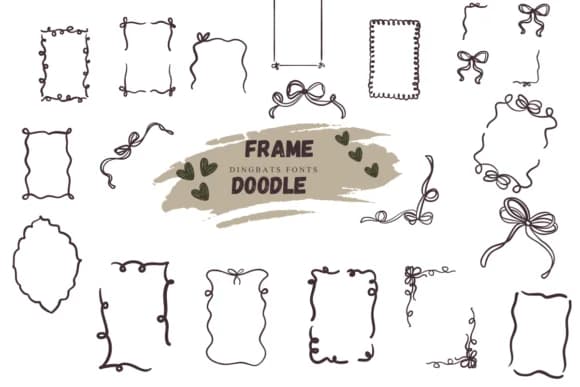
Hand-drawn doodles bring a playful, handmade warmth to any design. Frame Doodle by Suphitchaya is a sketch-style dingbats font overflowing with whimsical borders, frames, and decorative elements that feel genuinely personal rather than corporate.
You'll find it shines for wedding invitation suites where you want that craft-made feel instead of mass-produced polish, DIY stationery sets with hand-sketched charm that clients actually notice, boutique product labels that need genuine personality to stand out on shelves, and children's book illustrations where doodle elements add character. The font includes both outline and filled versions, giving you the flexibility to color or layer elements within Affinity Designer, Affinity Photo, or Procreate. Its horizontal frame elements and rectangular decorative borders are specifically useful for framing quotes or text blocks, creating custom page dividers, or building scrapbook layouts without needing to sketch anything from scratch. Each element has that imperfect, sketchy quality that reads as intentionally hand-drawn rather than digitally generic.
Pair Frame Doodle with a clean, minimal sans-serif like a light geometric typeface for any body copy or smaller text. This contrast keeps layouts readable while letting the doodles stay the visual centerpiece. Grab it from Creative Fabrica when you're ready to add that sketch-drawn magic to whatever project is next.
Style & Use Cases
- Overall Style
- Iconographic, Fonts
- Use Case
- Icons, Accents
- Ideal For
- ornaments, bullets, and decorative flourishes
- Pairs With
- any text font
How to Install Frame Doodle Font
Step-by-step instructions for every platform
- 1Download the Frame Doodle font file (.ttf or .otf).
- 2Locate the downloaded file in your Downloads folder.
- 3Right-click the font file.
- 4Select "Install" to install for the current user, or "Install for all users" to make it available system-wide.
- 5Frame Doodle is now available in Word, Photoshop, Illustrator, and all other apps.
More by Suphitchaya
View all →

Browse fonts by theme
Curated collections →Saw a font in a picture? Identify any font from an image with our free Font Finder.
More Dingbats Fonts
Browse all →







What pairs well with Frame Doodle Font?
Frame Doodle Font is a versatile dingbats font that works for both headings and body text. Pair it with a contrasting sans-serif or serif font to add visual interest and a clear distinction between titles and body copy.



Frame Doodle Font
by Suphitchaya
Reviewed by the FontBoxDL team · Updated June 2026