
 1 / 8
1 / 8About Frame Font
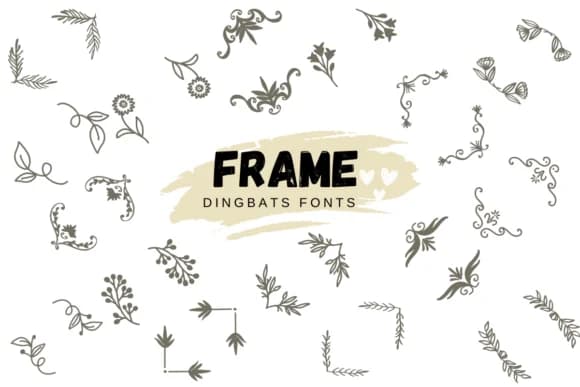
Frame by Suphitchaya is a dingbats collection built entirely around hand-drawn floral motifs, ornamental borders, and decorative flourishes. The letterforms here aren't characters in the traditional sense (they're standalone design elements): delicate corner frames, filigree patterns, decorative dividers, and ornamental flourishes that layer naturally together. What distinguishes this font is the restraint in its ornament; nothing feels heavy or overwrought, which is why these elements integrate so cleanly into both minimal and maximalist compositions.
You'll find this particularly useful for wedding invitation suites where you need a cohesive ornamental language threading through every piece of the suite, greeting card layouts that benefit from consistent embellishment across a series, boutique product labels and packaging where a handmade aesthetic carries weight, or scrapbooking compositions where decorative continuity matters without exhausting exact repetition. The hand-drawn character prevents that cold, templated feeling some purely digital decorative fonts can carry, even when you're reusing the same border or corner across multiple applications and materials.
Frame suits designers who view ornamentation as visual structure rather than decoration for its own sake. It works especially well for branded collateral, editorial layouts, and invitations where layered visual interest makes a piece feel considered and intentional, built rather than assembled from stock elements. Get Frame on Creative Fabrica.
Style & Use Cases
- Overall Style
- Iconographic, Fonts
- Use Case
- Icons, Accents
- Ideal For
- ornaments, bullets, and decorative flourishes
- Pairs With
- any text font
How to Install Frame Font
Step-by-step instructions for every platform
- 1Download the Frame font file (.ttf or .otf).
- 2Locate the downloaded file in your Downloads folder.
- 3Right-click the font file.
- 4Select "Install" to install for the current user, or "Install for all users" to make it available system-wide.
- 5Frame is now available in Word, Photoshop, Illustrator, and all other apps.
More by Suphitchaya
View all →

Browse fonts by theme
Curated collections →Saw a font in a picture? Identify any font from an image with our free Font Finder.
More Dingbats Fonts
Browse all →







What pairs well with Frame Font?
Frame Font is a versatile dingbats font that works for both headings and body text. Pair it with a contrasting sans-serif or serif font to add visual interest and a clear distinction between titles and body copy.



Frame Font
by Suphitchaya
Reviewed by the FontBoxDL team · Updated August 2026