
 1 / 5
1 / 5About Foodia Font
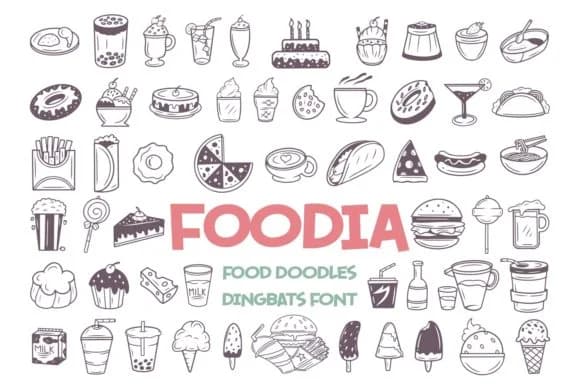
Foodia brings immediate warmth and charm to any design that needs a culinary touch. This dingbats collection from designer Dito of 7NTypes transforms simple food icons into personality-packed design elements that feel both handmade and deliberate.
What makes Foodia valuable isn't just the visual appeal, but the specific projects where it fits naturally. Think custom recipe cards for a personal cookbook, vintage-style food packaging labels for boutique spreads and artisan sauces, bistro and cafe branding that needs character, or hand-lettered greeting cards celebrating everything from dinner parties to culinary milestones. Small food makers depend on fonts like this to build visual recognition without feeling corporate or sterile. Social media content for food-focused accounts gets an immediate boost from the same doodled authenticity, as does product photography styling for Etsy shops or independent food brands looking to stand out. The hand-drawn quality reads as intentional rather than clip-art convenience.
Foodia shines brightest when paired with restraint: a clean, legible sans-serif like Lato or Nunito keeps body text readable while the dingbats claim center stage. This balance prevents designs from tipping into overcrowded territory. You'll find Foodia on Creative Fabrica, ready to bring genuine character and warmth to your next food-focused project.
Style & Use Cases
- Overall Style
- Iconographic, Food Doodles
- Use Case
- Icons, Accents
- Ideal For
- ornaments, bullets, and decorative flourishes
- Pairs With
- any text font
How to Install Foodia Font
Step-by-step instructions for every platform
- 1Download the Foodia font file (.ttf or .otf).
- 2Locate the downloaded file in your Downloads folder.
- 3Right-click the font file.
- 4Select "Install" to install for the current user, or "Install for all users" to make it available system-wide.
- 5Foodia is now available in Word, Photoshop, Illustrator, and all other apps.
More by Dito (7NTypes)
View all →
Browse fonts by theme
Curated collections →Saw a font in a picture? Identify any font from an image with our free Font Finder.
More Dingbats Fonts
Browse all →







What pairs well with Foodia Font?
Foodia Font is a versatile dingbats font that works for both headings and body text. Pair it with a contrasting sans-serif or serif font to add visual interest and a clear distinction between titles and body copy.



Foodia Font
Reviewed by the FontBoxDL team · Updated July 2026