
 1 / 5
1 / 5About Flowere Leaves Font
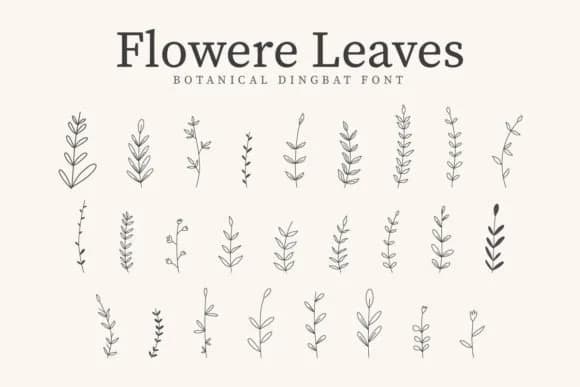
Organic shapes and whimsical botanical details create an immediate sense of natural charm. Flowere Leaves, created by CraftedType Studio, is a dingbat font built from hand-drawn botanical motifs that work as reusable design elements and composable layers.
The versatility here is what makes it genuinely useful for real-world projects. Use it to layer leafy borders and accents on wedding invitation suites, scatter delicate botanical elements across DIY wall decals and wooden craft signs, or build cohesive sticker packs for Etsy sellers and small creative businesses. Because it's a symbol font with clean, scalable vector shapes, it works equally well for custom t-shirt graphics, artisan product packaging labels, scrapbook page embellishments, or small-business logo marks and brand identity systems. Each glyph scales beautifully without any pixelation or quality loss, so you can use the same character at 12 points or 120 without compromise.
The botanical aesthetic pairs beautifully with a neutral sans-serif like Inter or Cabin when you need accompanying headers or body text, keeping the organic leaf elements as your primary visual anchor. Grab Flowere Leaves on Creative Fabrica and add this nature-inspired toolkit to your next project.
Style & Use Cases
- Overall Style
- Iconographic, Sticker Fonts
- Use Case
- Icons, Accents
- Ideal For
- ornaments, bullets, and decorative flourishes
- Pairs With
- any text font
How to Install Flowere Leaves Font
Step-by-step instructions for every platform
- 1Download the Flowere Leaves font file (.ttf or .otf).
- 2Locate the downloaded file in your Downloads folder.
- 3Right-click the font file.
- 4Select "Install" to install for the current user, or "Install for all users" to make it available system-wide.
- 5Flowere Leaves is now available in Word, Photoshop, Illustrator, and all other apps.
More by CraftedType Studio
View all →



Browse fonts by theme
Curated collections →Saw a font in a picture? Identify any font from an image with our free Font Finder.
More Dingbats Fonts
Browse all →







What pairs well with Flowere Leaves Font?
Flowere Leaves Font is a versatile dingbats font that works for both headings and body text. Pair it with a contrasting sans-serif or serif font to add visual interest and a clear distinction between titles and body copy.



Flowere Leaves Font
Reviewed by the FontBoxDL team · Updated July 2026