
 1 / 5
1 / 5About Flower Divider Font
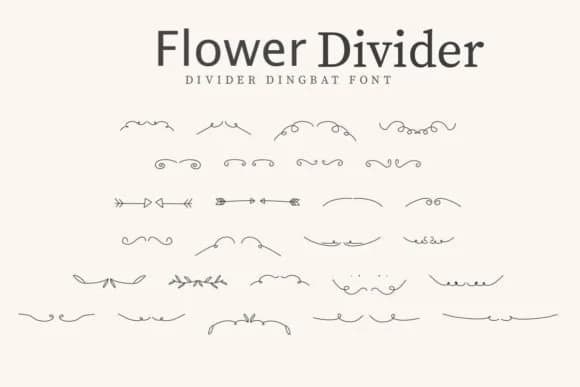
Flower Divider by CraftedType Studio presents a collection of botanical flourishes and floral separators designed to function as visual pauses in your layouts. These ornamental characters sit between pure decoration and practical divider, offering organic detail that doesn't overshadow your main content. The letterforms carry genuine botanical character, with petals and stems that feel hand-drawn rather than templated.
Wedding invitation suites gain real sophistication from these florals, especially when paired with serif typography or calligraphy. Etsy sellers use them frequently on handmade product labels, particularly for skincare packaging, tea blends, and artisanal bath products where a natural aesthetic matters. DIY craft signs benefit from the texture and rhythm these characters bring to layouts. Scrapbooking projects, decorative stationery borders, and sticker designs all gain dimension from the floral vocabulary. If you're developing a logo that needs subtle botanical elements or building a cohesive border system across a brand suite, this font delivers restraint and style in equal measure.
This is the right choice for makers and designers who understand that texture and visual rhythm matter as much as the words themselves. You'll discover it on Creative Fabrica, ready to integrate directly into your workflow.
Style & Use Cases
- Overall Style
- Iconographic, Sticker Fonts
- Use Case
- Icons, Accents
- Ideal For
- ornaments, bullets, and decorative flourishes
- Pairs With
- any text font
How to Install Flower Divider Font
Step-by-step instructions for every platform
- 1Download the Flower Divider font file (.ttf or .otf).
- 2Locate the downloaded file in your Downloads folder.
- 3Right-click the font file.
- 4Select "Install" to install for the current user, or "Install for all users" to make it available system-wide.
- 5Flower Divider is now available in Word, Photoshop, Illustrator, and all other apps.
More by CraftedType Studio
View all →



Browse fonts by theme
Curated collections →Saw a font in a picture? Identify any font from an image with our free Font Finder.
More Dingbats Fonts
Browse all →







What pairs well with Flower Divider Font?
Flower Divider Font is a versatile dingbats font that works for both headings and body text. Pair it with a contrasting sans-serif or serif font to add visual interest and a clear distinction between titles and body copy.



Flower Divider Font
Reviewed by the FontBoxDL team · Updated July 2026