
 1 / 8
1 / 8About Flower Boho Font
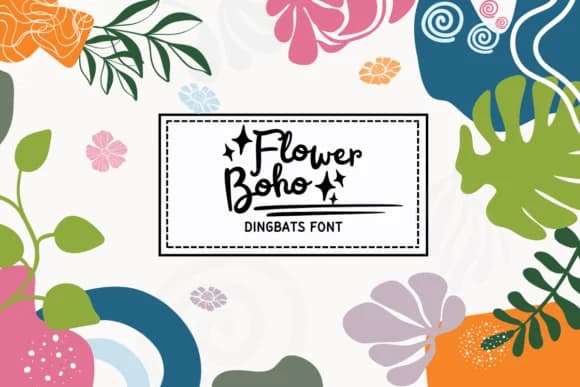
This playful dingbats collection brings an organic, nature-inspired sensibility to decorative design work. Flower Boho, created by PraewDesigns, is a curated set of abstract floral and leaf elements with a distinctly boho aesthetic. The ornaments include delicate flowers, organic leaves, and decorative botanical shapes that blend freely with hand-lettered typography, modern sans-serif, or script fonts.
Wedding invitation suites gain visual depth when you layer these florals as borders, corner flourishes, or accent marks between text blocks. DIY craft projects benefit directly from the collection, especially when designing Thanksgiving place cards, rustic gift tags, and hand-lettered autumn signage for seasonal gifting. The designs translate naturally into contemporary tattoo references and apparel graphics, where the organic shapes add visual warmth without overwhelming the composition. Scrapbooking layouts rely on the background elements and banner pieces to define sections, create transitions between photos and journaling, or simply add an unexpected botanical flourish to page corners.
Pair Flower Boho with a clean, minimal sans-serif for legible body copy, letting the botanical ornaments shine without competing for attention. The contrast between delicate decoration and straightforward typography creates a professional yet approachable balance. You'll find the full collection on Creative Fabrica, ready to add an earthy, hand-crafted quality to any design.
Style & Use Cases
- Overall Style
- Iconographic, Flower Boho
- Use Case
- Icons, Accents
- Ideal For
- ornaments, bullets, and decorative flourishes
- Pairs With
- any text font
How to Install Flower Boho Font
Step-by-step instructions for every platform
- 1Download the Flower Boho font file (.ttf or .otf).
- 2Locate the downloaded file in your Downloads folder.
- 3Right-click the font file.
- 4Select "Install" to install for the current user, or "Install for all users" to make it available system-wide.
- 5Flower Boho is now available in Word, Photoshop, Illustrator, and all other apps.
More by PraewDesigns
View all →
Browse fonts by theme
Curated collections →Saw a font in a picture? Identify any font from an image with our free Font Finder.
More Dingbats Fonts
Browse all →







What pairs well with Flower Boho Font?
Flower Boho Font is a versatile dingbats font that works for both headings and body text. Pair it with a contrasting sans-serif or serif font to add visual interest and a clear distinction between titles and body copy.



Flower Boho Font
by PraewDesigns
Reviewed by the FontBoxDL team · Updated July 2026