
 1 / 5
1 / 5About Flower Arrow Font
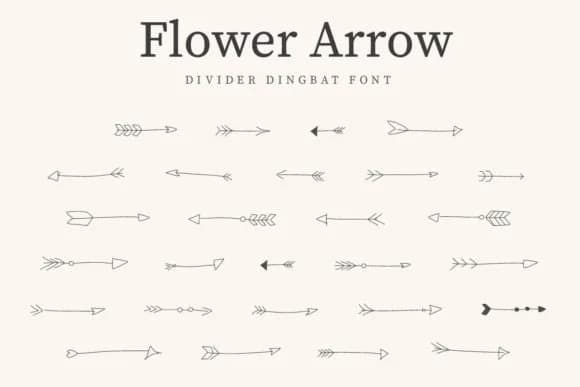
You're designing a set of gift tags for a craft market and need something that reads warm without being overly precious. Flower Arrow from CraftedType Studio delivers exactly that: a dingbat typeface built from delicate floral arrow elements that feel handcrafted rather than sterile. The flowing nature of each character shines from the tiniest label to the largest title treatment.
The font excels in contexts where decoration and function need to work together. Etsy sticker designers use it to add ornamental borders to custom label sets, creating products that stand out in a crowded marketplace. Greeting card creators layer it into layouts where a touch of botanical styling guides the eye without overwhelming the text. DIY craft signs and scrapbook pages both benefit from its ability to frame key words or add dimensional accents between photos and journaling.
What makes Flower Arrow genuinely useful is how the individual glyphs work both as standalone design elements and as building blocks for larger ornamental passages. The dingbat construction means you're working with actual arrow and flower characters rather than decorative letter shapes, giving you more control over placement and composition. Grab it from Creative Fabrica when you're ready to add this nature-inspired character to your next project.
Style & Use Cases
- Overall Style
- Iconographic, Flower Arrow
- Use Case
- Icons, Accents
- Ideal For
- ornaments, bullets, and decorative flourishes
- Pairs With
- any text font
How to Install Flower Arrow Font
Step-by-step instructions for every platform
- 1Download the Flower Arrow font file (.ttf or .otf).
- 2Locate the downloaded file in your Downloads folder.
- 3Right-click the font file.
- 4Select "Install" to install for the current user, or "Install for all users" to make it available system-wide.
- 5Flower Arrow is now available in Word, Photoshop, Illustrator, and all other apps.
More by CraftedType Studio
View all →



Browse fonts by theme
Curated collections →Saw a font in a picture? Identify any font from an image with our free Font Finder.
More Dingbats Fonts
Browse all →







What pairs well with Flower Arrow Font?
Flower Arrow Font is a versatile dingbats font that works for both headings and body text. Pair it with a contrasting sans-serif or serif font to add visual interest and a clear distinction between titles and body copy.



Flower Arrow Font
Reviewed by the FontBoxDL team · Updated July 2026