
 1 / 8
1 / 8About Floral Tattoo Font
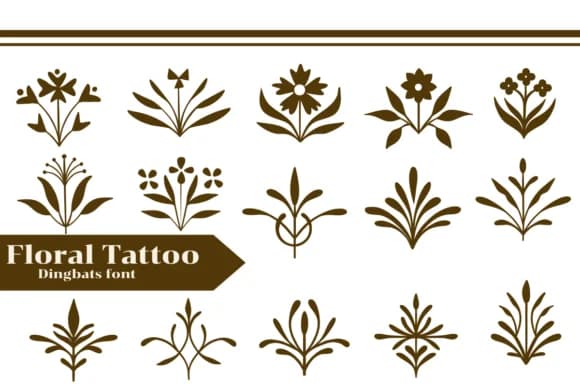
This dingbats font captures a romantic, hand-drawn botanical spirit. Floral Tattoo from Apiwat Type gives you a rich collection of symmetrical, inked-style flower and leaf glyphs that feel both timeless and contemporary. Each motif is rooted in natural forms, from delicate petals to intricate foliage and vine work, making it a standout option for wedding invitation suites, vintage-inspired logo details, boutique skincare packaging, and DIY botanical sign projects. The designs carry that tattoo aesthetic, with clean lines and balanced compositions that read beautifully at any scale.
What makes this font particularly useful is how reliably the vector glyphs maintain their integrity across different sizes and applications. Across Procreate, Affinity Designer, and other vector tools, these ornamental marks deliver consistent quality and charm. The collection includes enough variation that you can layer and combine elements to create entirely original compositions without feeling like you're repeating the same motif. That flexibility means one dingbats font can support projects from social media graphics to printed ephemera.
Pair Floral Tattoo with a clean, minimalist sans-serif for body copy to balance its ornamental presence, or use it solo as a decorative accent on packaging and print materials. Grab it from Creative Fabrica and start building botanical-inspired designs.
Style & Use Cases
- Overall Style
- Iconographic, Fonts
- Use Case
- Icons, Accents
- Ideal For
- ornaments, bullets, and decorative flourishes
- Pairs With
- any text font
How to Install Floral Tattoo Font
Step-by-step instructions for every platform
- 1Download the Floral Tattoo font file (.ttf or .otf).
- 2Locate the downloaded file in your Downloads folder.
- 3Right-click the font file.
- 4Select "Install" to install for the current user, or "Install for all users" to make it available system-wide.
- 5Floral Tattoo is now available in Word, Photoshop, Illustrator, and all other apps.
More by Apiwat Type
View all →
Browse fonts by theme
Curated collections →Saw a font in a picture? Identify any font from an image with our free Font Finder.
More Dingbats Fonts
Browse all →







What pairs well with Floral Tattoo Font?
Floral Tattoo Font is a versatile dingbats font that works for both headings and body text. Pair it with a contrasting sans-serif or serif font to add visual interest and a clear distinction between titles and body copy.



Floral Tattoo Font
by Apiwat Type
Reviewed by the FontBoxDL team · Updated July 2026