
 1 / 8
1 / 8About Flash Art Font
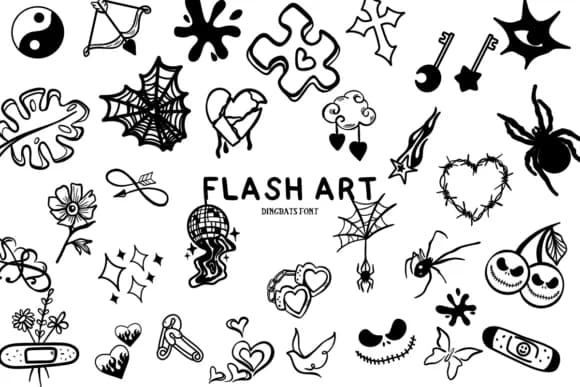
Flash Art by Bee piyanuch is a dingbat collection that channels classic tattoo imagery into sharp, playful symbols. The font draws inspiration from traditional flash art aesthetics, delivering bold skull icons, retro flourishes, and graphic elements that feel authentically hand-drawn yet crisp at any size.
This works brilliantly for Halloween party invitations where you want real personality and attitude without trying too hard. Tattoo artists rely on it to quickly organize portfolio layouts and flash sheets without hunting through endless reference libraries. Concert posters and music event graphics come alive with its vintage edge and grit, while DIY vinyl decal projects benefit from characters that scale cleanly across applications. The collection also fits perfectly into goth and punk branding work, spooky greeting card designs, and any creative project where you need personality with that slightly dangerous feel or throwback vibe.
You'll find Flash Art available in both OTF and TTF formats, making it fully compatible with Procreate, Affinity Designer, Affinity Font, and Affinity Photo. This dingbat set works well for building throwback music brand identities or creating October decorations that skip the usual predictable imagery. Grab Flash Art on Creative Fabrica and add some genuine edge to your work.
Style & Use Cases
- Overall Style
- Iconographic, Flash Art
- Use Case
- Icons, Accents
- Ideal For
- ornaments, bullets, and decorative flourishes
- Pairs With
- any text font
How to Install Flash Art Font
Step-by-step instructions for every platform
- 1Download the Flash Art font file (.ttf or .otf).
- 2Locate the downloaded file in your Downloads folder.
- 3Right-click the font file.
- 4Select "Install" to install for the current user, or "Install for all users" to make it available system-wide.
- 5Flash Art is now available in Word, Photoshop, Illustrator, and all other apps.
More by Bee piyanuch
View all →
Browse fonts by theme
Curated collections →Saw a font in a picture? Identify any font from an image with our free Font Finder.
More Dingbats Fonts
Browse all →







What pairs well with Flash Art Font?
Flash Art Font is a versatile dingbats font that works for both headings and body text. Pair it with a contrasting sans-serif or serif font to add visual interest and a clear distinction between titles and body copy.



Flash Art Font
by Bee piyanuch
Reviewed by the FontBoxDL team · Updated July 2026