
 1 / 8
1 / 8About Ferra Font
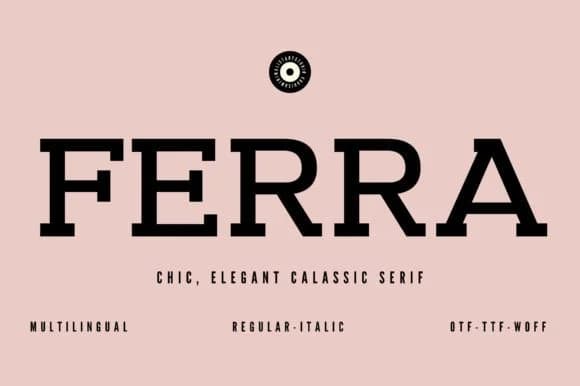
This typeface channels the confident warmth of 1970s design while keeping modern polish intact. Ferra, created by Minimalistartstudio, is a slab serif that bridges nostalgic character with contemporary refinement, delivering visual weight that photographs beautifully in print and digital contexts.
The bold, geometric serifs make this typeface particularly effective for album artwork and music identity systems where personality and memorability matter most. It excels on upscale skincare packaging and boutique product labels where retro appeal signals quality, and works just as well for vintage restaurant branding that wants to feel established. Wedding invitation suites benefit from its elegant thickness and steady presence, while independent publishers favor it for book jacket headlines and chapter title treatments that demand reader attention. The chunky letterforms deliver authentic 70s gravitas without ever feeling costume-like or ironic.
Combine Ferra with a clean, narrow sans-serif for body text to create genuine visual contrast and let each typeface maintain its distinct voice. The pairing keeps layouts feeling current while the slab serif handles the heavy lifting on impact and memorability. You'll find it on Creative Fabrica, ready to add that retro-modern punch to your next identity or publication project.
Style & Use Cases
- Overall Style
- Sturdy, Confident, 70s
- Use Case
- Headlines, Merch
- Ideal For
- vintage posters, logos, and product packaging
- Pairs With
- a light sans-serif
How to Install Ferra Font
Step-by-step instructions for every platform
- 1Download the Ferra font file (.ttf or .otf).
- 2Locate the downloaded file in your Downloads folder.
- 3Right-click the font file.
- 4Select "Install" to install for the current user, or "Install for all users" to make it available system-wide.
- 5Ferra is now available in Word, Photoshop, Illustrator, and all other apps.
More by Minimalistartstudio
View all →



Browse fonts by theme
Curated collections →Saw a font in a picture? Identify any font from an image with our free Font Finder.
More Slab Serif Fonts
Browse all →







What pairs well with Ferra Font?
Ferra Font is a slab serif font that shines as a display or heading face. Pair it with a clean sans-serif or serif font for body text — the contrast creates a clear hierarchy while the two styles stay balanced and easy to read.



Ferra Font
Reviewed by the FontBoxDL team · Updated September 2026