
 1 / 5
1 / 5About Fancy Divider Font
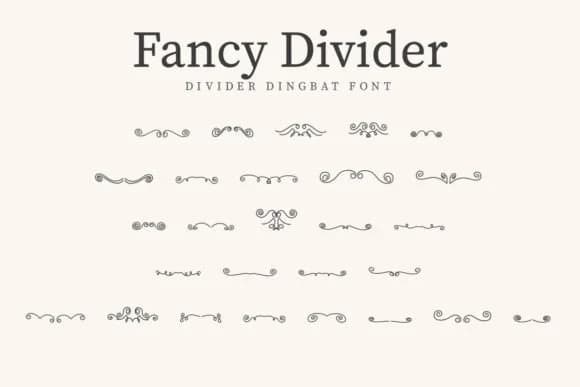
Fancy Divider from CraftedType Studio delivers ornamental flourishes and decorative elements that sit between text and graphics, adding visual breathing room to layouts. The character set draws on vintage letterpress ornamentation, offering your designs punctuation marks that feel handcrafted rather than stamped out digitally. Each glyph carries authentic nostalgic weight without sliding into kitsch or dated design.
This dingbat shines in specific contexts where ornamentation actually matters. Wedding invitation suites benefit enormously from small flourishes that frame text and anchor the overall design. Etsy product listings and labels use it to break up category text and draw attention to item names. Boutique packaging projects, especially for artisan skincare or small-batch food brands, gain quiet sophistication from these marks. DIY craft signs and vintage poster work also come alive with these decorative elements, whether you're recreating mid-century ephemera or building something new with a deliberate retro edge.
CraftedType built the set with real range in mind, so you'll find dividers, ornaments, and flourishes that adapt across different design contexts and styles. It suits anyone who brings craftsmanship to their design work, where small flourishes signal genuine attention to detail. Find Fancy Divider on Creative Fabrica and add it to your collection.
Style & Use Cases
- Overall Style
- Iconographic, Vintage Elegance
- Use Case
- Icons, Accents
- Ideal For
- ornaments, bullets, and decorative flourishes
- Pairs With
- any text font
How to Install Fancy Divider Font
Step-by-step instructions for every platform
- 1Download the Fancy Divider font file (.ttf or .otf).
- 2Locate the downloaded file in your Downloads folder.
- 3Right-click the font file.
- 4Select "Install" to install for the current user, or "Install for all users" to make it available system-wide.
- 5Fancy Divider is now available in Word, Photoshop, Illustrator, and all other apps.
More by CraftedType Studio
View all →



Browse fonts by theme
Curated collections →Saw a font in a picture? Identify any font from an image with our free Font Finder.
More Dingbats Fonts
Browse all →







What pairs well with Fancy Divider Font?
Fancy Divider Font is a versatile dingbats font that works for both headings and body text. Pair it with a contrasting sans-serif or serif font to add visual interest and a clear distinction between titles and body copy.



Fancy Divider Font
Reviewed by the FontBoxDL team · Updated July 2026