 Firefox
 1 / 9
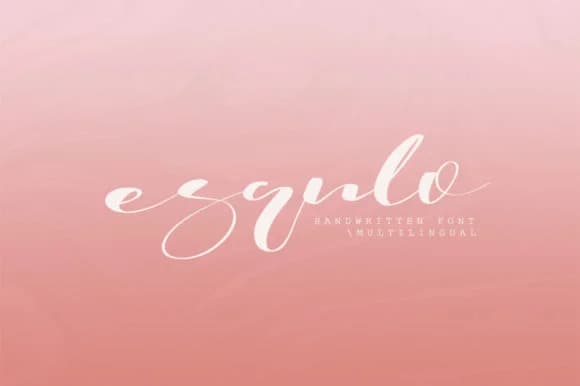
1 / 9About Esqulo Font
There's something compelling about a script typeface that doesn't announce itself loudly. Esqulo, designed by Katie Holland, is a modern handwritten script that balances personality with restraint, bringing a human touch to professional design work without sliding into the decorative territory that trips up many script fonts.
Where does Esqulo truly shine? Wedding invitation suites, where the script conveys both elegance and intimacy in a single gesture. Luxury product labels for artisan food, cosmetics, and skincare brands that need to feel premium yet approachable to their customers. Social media post headers and Instagram Stories that benefit from hand-lettered character without sacrificing readability or modern sensibility. Photography watermarks and quote overlays for creative professionals who want a distinctive signature that complements rather than competes with the image. The letterforms stay clean and legible even at smaller sizes, opening applications well beyond headlines and hero text.
Pair Esqulo with a minimal geometric sans-serif for body copy and supporting typography hierarchy, letting the script carry your design voice. You'll find it ready to download on Creative Fabrica whenever you're ready to add that contemporary-handwritten quality to your next project.
Style & Use Cases
- Overall Style
- Elegant, Flowing, Esqulo
- Use Case
- Invitations, Branding
- Ideal For
- wedding stationery, greeting cards, and signatures
- Pairs With
- a simple uppercase sans
How to Install Esqulo Font Font
Step-by-step instructions for every platform
- 1Download the Esqulo Font font file (.ttf or .otf).
- 2Locate the downloaded file in your Downloads folder.
- 3Right-click the font file.
- 4Select "Install" to install for the current user, or "Install for all users" to make it available system-wide.
- 5Esqulo Font is now available in Word, Photoshop, Illustrator, and all other apps.
More by Katie Holland
View all →
Browse fonts by theme
Curated collections →Saw a font in a picture? Identify any font from an image with our free Font Finder.
More Script Handwritten Fonts
Browse all →







What pairs well with Esqulo Font?
Esqulo Font is a script font that shines as a display or heading face. Pair it with a clean sans-serif or serif font for body text — the contrast creates a clear hierarchy while the two styles stay balanced and easy to read.



Esqulo Font
Reviewed by the FontBoxDL team · Updated June 2026