
 1 / 8
1 / 8About Emoji Doodle Font
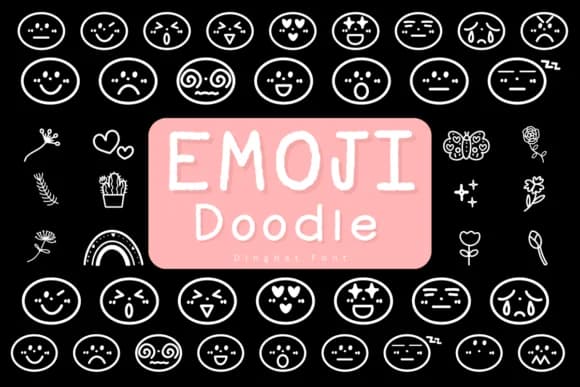
Picture yourself designing a batch of personalized birthday cards that feel genuinely playful without requiring weeks of hand-illustration. Emoji Doodle, created by Kanink Type Studio, is a dingbat font that fills exactly that gap. By typing simple characters, you unlock a full library of cheerful, hand-drawn emoji and doodle elements that give your work real charm and warmth.
The font's true value shows up across multiple design applications. Hand-lettered greeting card suites gain instant personality and rhythm when you tuck these doodles between text. Etsy sticker sheet layouts pop with more character using these sketchy marks as accents and visual breaks. Scrapbooking pages get dimensional appeal with scattered doodles that feel intentional rather than random, while digital invitation templates become noticeably more relatable and less generic when these expressive marks are sprinkled throughout. You're working with cartoon-style illustrations that convey genuine feeling without any corporate polish.
Because it's a symbol font, access is straightforward: just type and the characters appear. Hand-drawn linework keeps everything legible at smaller sizes, yet the playful details really shine when printed large or used as prominent design elements. Its sketchy, informal style grounds designs in personality. Get it on Creative Fabrica and add these doodles to your next project.
Style & Use Cases
- Overall Style
- Iconographic, Emoji
- Use Case
- Icons, Accents
- Ideal For
- ornaments, bullets, and decorative flourishes
- Pairs With
- any text font
How to Install Emoji Doodle Font
Step-by-step instructions for every platform
- 1Download the Emoji Doodle font file (.ttf or .otf).
- 2Locate the downloaded file in your Downloads folder.
- 3Right-click the font file.
- 4Select "Install" to install for the current user, or "Install for all users" to make it available system-wide.
- 5Emoji Doodle is now available in Word, Photoshop, Illustrator, and all other apps.
More by Kanink Type Studio
View all →


Browse fonts by theme
Curated collections →Saw a font in a picture? Identify any font from an image with our free Font Finder.
More Dingbats Fonts
Browse all →







What pairs well with Emoji Doodle Font?
Emoji Doodle Font is a versatile dingbats font that works for both headings and body text. Pair it with a contrasting sans-serif or serif font to add visual interest and a clear distinction between titles and body copy.



Emoji Doodle Font
Reviewed by the FontBoxDL team · Updated July 2026