
 1 / 8
1 / 8About Emo Doodle Font
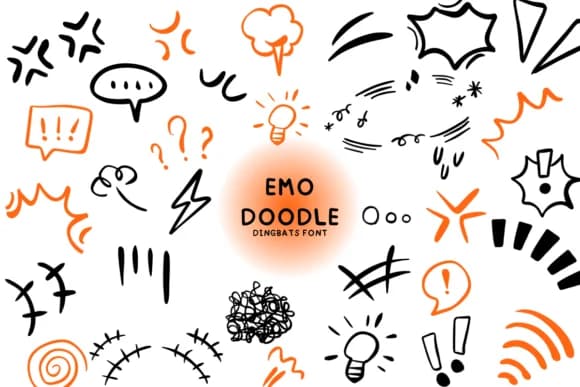
You're laying out a zine cover with hand-drawn skulls and lightning bolts, and Emo Doodle by Bee piyanuch is exactly what you need to make it work. This dingbats font delivers a sketch-style collection of characters and symbols that capture that sweet spot between playful and edgy. The line work feels genuinely hand-drawn, with the kind of rough authenticity that makes your designs feel personal rather than polished.
It shines for album artwork and music merchandise, especially for indie bands and alternative musicians building their own visual identity. Sticker packs for indie craft shops, greeting cards with attitude and personality, and DIY tattoo flash sheets all benefit from this library of sketched symbols. Custom designs for Etsy sellers, social media graphics for alternative brands, and merchandise for emerging independent labels all gain character from the rough aesthetic. Hearts, stars, monsters, and skulls each carry their own distinct vibe, so layering them lets you build complex compositions that feel intentional rather than generic.
With a single weight, everything stays straightforward, and the whole set scales beautifully from small social media crops to large-format poster designs. Grab Emo Doodle from Creative Fabrica and give your next project some real character and edge.
Style & Use Cases
- Overall Style
- Iconographic, Emo Doodle
- Use Case
- Icons, Accents
- Ideal For
- ornaments, bullets, and decorative flourishes
- Pairs With
- any text font
How to Install Emo Doodle Font
Step-by-step instructions for every platform
- 1Download the Emo Doodle font file (.ttf or .otf).
- 2Locate the downloaded file in your Downloads folder.
- 3Right-click the font file.
- 4Select "Install" to install for the current user, or "Install for all users" to make it available system-wide.
- 5Emo Doodle is now available in Word, Photoshop, Illustrator, and all other apps.
More by Bee piyanuch
View all →
Browse fonts by theme
Curated collections →Saw a font in a picture? Identify any font from an image with our free Font Finder.
More Dingbats Fonts
Browse all →







What pairs well with Emo Doodle Font?
Emo Doodle Font is a versatile dingbats font that works for both headings and body text. Pair it with a contrasting sans-serif or serif font to add visual interest and a clear distinction between titles and body copy.



Emo Doodle Font
by Bee piyanuch
Reviewed by the FontBoxDL team · Updated August 2026