
 1 / 8
1 / 8About Elements Font
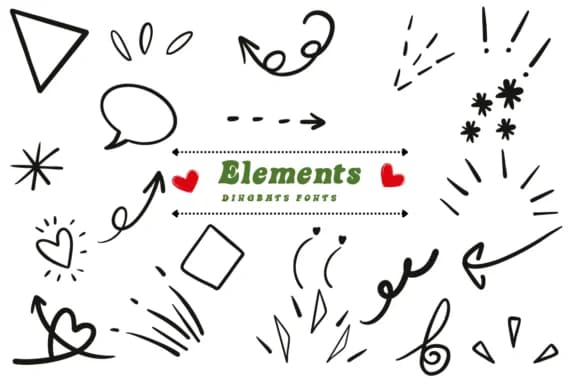
This ornate collection brings a sense of whimsical sophistication to any design that needs visual flourish. Elements, created by Suphitchaya, is a dingbats font built around abstract symbols and decorative shapes with an old-world charm that reads as deliberately handcrafted rather than computer-generated.
The font shines brightest when you're layering it into wedding invitation suites, where its delicate ornamental borders and flourishes frame your primary typography with grace. It works equally well for handmade product label designs (especially those vintage-inspired beauty or stationery brands on platforms like Etsy), certificate designs where decorative frames matter, and scrapbooking pages that call for textural embellishment without overwhelming the layout. The glyphs include both solid and coloring outline versions, giving you options depending on your design intent. Both OTF and TTF formats ensure compatibility across Procreate, Affinity Designer, and Affinity Photo, so you can grab Elements whether you prefer desktop or mobile design workflows.
Pair this with a straightforward geometric sans-serif like Montserrat or Lato to keep your overall composition balanced and legible throughout. When ornamental details meet modern clarity, the contrast feels intentional and polished rather than overdone. Grab Elements on Creative Fabrica and add these decorative symbols to your growing design toolkit.
Style & Use Cases
- Overall Style
- Iconographic, Fonts
- Use Case
- Icons, Accents
- Ideal For
- ornaments, bullets, and decorative flourishes
- Pairs With
- any text font
How to Install Elements Font
Step-by-step instructions for every platform
- 1Download the Elements font file (.ttf or .otf).
- 2Locate the downloaded file in your Downloads folder.
- 3Right-click the font file.
- 4Select "Install" to install for the current user, or "Install for all users" to make it available system-wide.
- 5Elements is now available in Word, Photoshop, Illustrator, and all other apps.
More by Suphitchaya
View all →
Browse fonts by theme
Curated collections →Saw a font in a picture? Identify any font from an image with our free Font Finder.
More Dingbats Fonts
Browse all →







What pairs well with Elements Font?
Elements Font is a versatile dingbats font that works for both headings and body text. Pair it with a contrasting sans-serif or serif font to add visual interest and a clear distinction between titles and body copy.



Elements Font
by Suphitchaya
Reviewed by the FontBoxDL team · Updated July 2026