
 1 / 8
1 / 8About Element Doodle Font
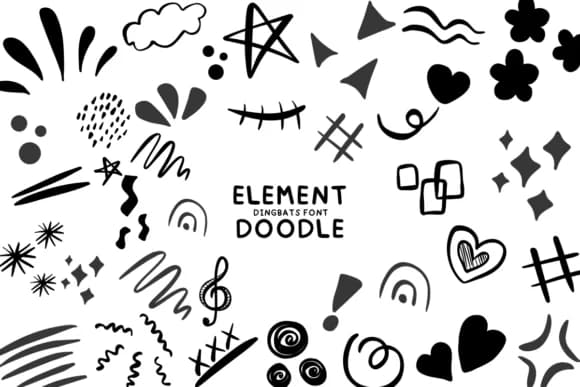
This font captures the playful energy of nature's raw forces at work. Element Doodle, designed by Bee piyanuch, is a dingbats collection built from hand-drawn interpretations of fire, water, earth, air, and weather phenomena. Each character works as a standalone doodle or as part of a larger design system, featuring a comprehensive library of elemental symbols covering everything from lightning bolts and storm clouds to snowflakes, trees, and flame patterns.
Use it for holiday card suites that need character and warmth, scrapbooking layouts where handmade details genuinely matter, bullet journal spreads and planner sticker designs that benefit from expressive visual markers, or vision board graphics seeking rich visual interest. It translates equally well to environmental nonprofit materials, children's book spot illustrations, or boutique product packaging where hand-drawn authenticity reads stronger than polished vector graphics. You build complete designs without hunting for complementary images or layering multiple icon sets, which saves time in tight workflows.
Pair Element Doodle with a clean, modern sans-serif like Montserrat or Rubik to keep body text readable while letting the doodles command visual attention. The contrast between structured typography and organic mark-making makes both elements work harder. Find it on Creative Fabrica and start building designs with genuine, unpolished personality.
Style & Use Cases
- Overall Style
- Iconographic, Element Doodle
- Use Case
- Icons, Accents
- Ideal For
- ornaments, bullets, and decorative flourishes
- Pairs With
- any text font
How to Install Element Doodle Font
Step-by-step instructions for every platform
- 1Download the Element Doodle font file (.ttf or .otf).
- 2Locate the downloaded file in your Downloads folder.
- 3Right-click the font file.
- 4Select "Install" to install for the current user, or "Install for all users" to make it available system-wide.
- 5Element Doodle is now available in Word, Photoshop, Illustrator, and all other apps.
More by Bee piyanuch
View all →
Browse fonts by theme
Curated collections →Saw a font in a picture? Identify any font from an image with our free Font Finder.
More Dingbats Fonts
Browse all →







What pairs well with Element Doodle Font?
Element Doodle Font is a versatile dingbats font that works for both headings and body text. Pair it with a contrasting sans-serif or serif font to add visual interest and a clear distinction between titles and body copy.



Element Doodle Font
by Bee piyanuch
Reviewed by the FontBoxDL team · Updated July 2026