
 1 / 8
1 / 8About Doodle Glass Font
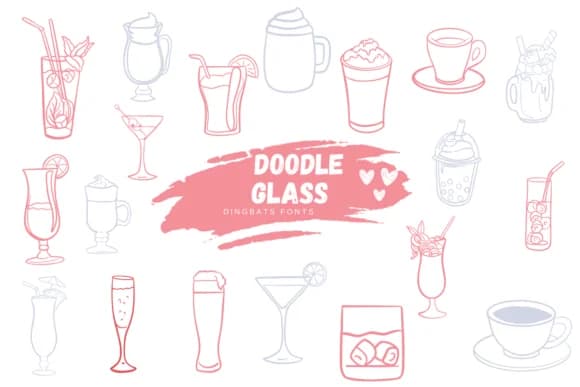
Suphitchaya's Doodle Glass captures the playful charm of hand-drawn beverage imagery with a cartoon aesthetic that instantly reads as friendly and approachable. As a dingbats font, it replaces standard characters with whimsical glass and drink illustrations, each rendered in clean outline strokes perfect for both digital and print workflows. The line weights are consistent and readable at any scale, making these tiny illustrations work from small sticker labels all the way up to oversized poster graphics.
The real strength here lies in specificity: this font shines for cocktail menu layouts, beverage-themed packaging labels, illustrated bar signage, and DIY coaster designs. Because each glyph is a tiny illustration rather than a letter, you're working with a full library of drinking-themed iconography that goes beyond generic drinkware silhouettes. Available in both OTF and TTF formats, it works across design tools including Procreate, Affinity Designer, and Affinity Photo, so you can sketch rough concepts, refine outlines, and prepare files for production without changing tools.
Illustrators, hand-lettering artists, product designers, and anyone creating drink-focused branding will find this font useful. Wine labels, craft brewery logos, and festive bar party invitations all benefit from the finished illustration style without the manual labor. Grab Doodle Glass on Creative Fabrica and start layering personality into your beverage-related designs.
Style & Use Cases
- Overall Style
- Iconographic, Fonts
- Use Case
- Icons, Accents
- Ideal For
- ornaments, bullets, and decorative flourishes
- Pairs With
- any text font
How to Install Doodle Glass Font
Step-by-step instructions for every platform
- 1Download the Doodle Glass font file (.ttf or .otf).
- 2Locate the downloaded file in your Downloads folder.
- 3Right-click the font file.
- 4Select "Install" to install for the current user, or "Install for all users" to make it available system-wide.
- 5Doodle Glass is now available in Word, Photoshop, Illustrator, and all other apps.
More by Suphitchaya
View all →
Browse fonts by theme
Curated collections →Saw a font in a picture? Identify any font from an image with our free Font Finder.
More Dingbats Fonts
Browse all →







What pairs well with Doodle Glass Font?
Doodle Glass Font is a versatile dingbats font that works for both headings and body text. Pair it with a contrasting sans-serif or serif font to add visual interest and a clear distinction between titles and body copy.



Doodle Glass Font
by Suphitchaya
Reviewed by the FontBoxDL team · Updated July 2026