
 1 / 8
1 / 8About Doodle Element Font
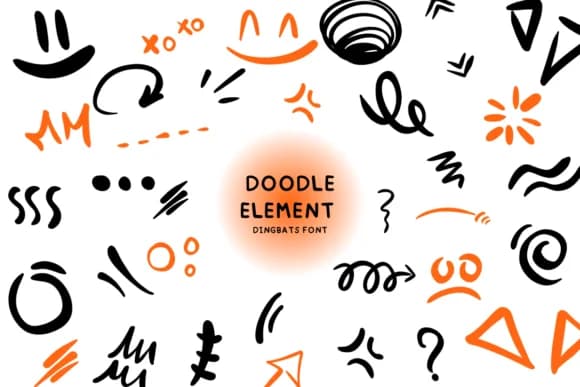
There's something inherently charming about hand-drawn marks, and this dingbats collection captures that warmth perfectly. Doodle Element, designed by Bee piyanuch, is a set of decorative glyphs that brings sketch-like character to layouts without requiring any actual drawing skill. The collection includes flowing lines, ornamental swirls, geometric shapes, and border elements that feel personal and playful.
Use it to frame greeting card text with delicate doodle borders, create ornamental frames for wedding invitation suites, add flourishes to boutique gift tag designs, or build custom bullet points throughout event stationery. Scrapbookers and planner enthusiasts will find the varied line weights and curved marks invaluable for adding personality to layouts. The hand-drawn quality makes these elements feel warm and approachable, ideal for brands that want to move away from sterile, mass-produced aesthetics. Small business owners designing packaging labels or DIY craft signage also benefit from the organic character this font brings to standalone graphics.
Pair Doodle Element with a straightforward sans-serif typeface when you need readable body copy, letting the decorative marks take center stage without creating visual clutter. The balance between whimsy and usability makes it a reliable tool for any design that calls for a human touch. You'll find it waiting on Creative Fabrica.
Style & Use Cases
- Overall Style
- Iconographic, Doodle Element
- Use Case
- Icons, Accents
- Ideal For
- ornaments, bullets, and decorative flourishes
- Pairs With
- any text font
How to Install Doodle Element Font
Step-by-step instructions for every platform
- 1Download the Doodle Element font file (.ttf or .otf).
- 2Locate the downloaded file in your Downloads folder.
- 3Right-click the font file.
- 4Select "Install" to install for the current user, or "Install for all users" to make it available system-wide.
- 5Doodle Element is now available in Word, Photoshop, Illustrator, and all other apps.
More by Bee piyanuch
View all →
Browse fonts by theme
Curated collections →Saw a font in a picture? Identify any font from an image with our free Font Finder.
More Dingbats Fonts
Browse all →







What pairs well with Doodle Element Font?
Doodle Element Font is a versatile dingbats font that works for both headings and body text. Pair it with a contrasting sans-serif or serif font to add visual interest and a clear distinction between titles and body copy.



Doodle Element Font
by Bee piyanuch
Reviewed by the FontBoxDL team · Updated July 2026