
 1 / 8
1 / 8About Diana Font
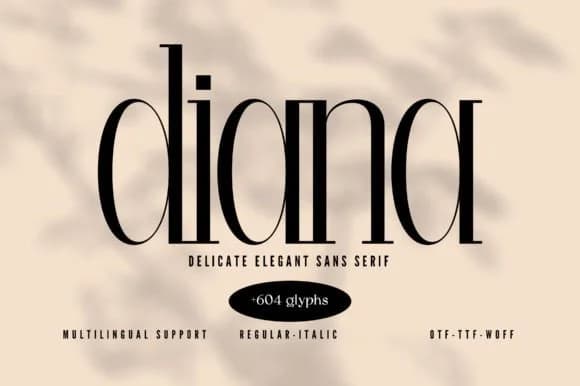
Diana by Minimalistartstudio is a slab serif that merges geometric precision with understated refinement. The typeface carries a distinctly retro character, drawing from 1970s modernism without veering into novelty territory. Each letter rests on sturdy, sculpted serifs that feel confident yet approachable, making Diana work equally well as a display face for headlines or running text at smaller sizes.
This font earns its place in luxury brand identity systems where visual restraint conveys quality and intentionality. Wedding invitation suites benefit from its composed authority, as do high-end cosmetics packaging and boutique hotel signage where the design needs to speak softly but distinctly. Gallery wall text and upscale restaurant menus also respond well to Diana's structured elegance. With 604 glyphs spanning extended Latin, Cyrillic, and Greek alphabets, the typeface handles multilingual projects with genuine depth, maintaining character consistency across language shifts without sacrificing the visual voice you've established.
Diana's minimalist foundation means it recedes gracefully when paired with photography or intricate design arrangements, letting other visual elements command focus. The font's inherent restraint actually amplifies what you layer it with, rather than competing for attention. Add Diana to your toolkit via Creative Fabrica and experience how it grounds luxury and editorial work.
Style & Use Cases
- Overall Style
- Sturdy, Confident, 70s
- Use Case
- Headlines, Merch
- Ideal For
- vintage posters, logos, and product packaging
- Pairs With
- a light sans-serif
How to Install Diana Font
Step-by-step instructions for every platform
- 1Download the Diana font file (.ttf or .otf).
- 2Locate the downloaded file in your Downloads folder.
- 3Right-click the font file.
- 4Select "Install" to install for the current user, or "Install for all users" to make it available system-wide.
- 5Diana is now available in Word, Photoshop, Illustrator, and all other apps.
More by Minimalistartstudio
View all →



Browse fonts by theme
Curated collections →Saw a font in a picture? Identify any font from an image with our free Font Finder.
More Slab Serif Fonts
Browse all →







What pairs well with Diana Font?
Diana Font is a slab serif font that shines as a display or heading face. Pair it with a clean sans-serif or serif font for body text — the contrast creates a clear hierarchy while the two styles stay balanced and easy to read.



Diana Font
Reviewed by the FontBoxDL team · Updated August 2026