 Firefox
 1 / 5
1 / 5About DETECTIVE CLIENT JNL Font
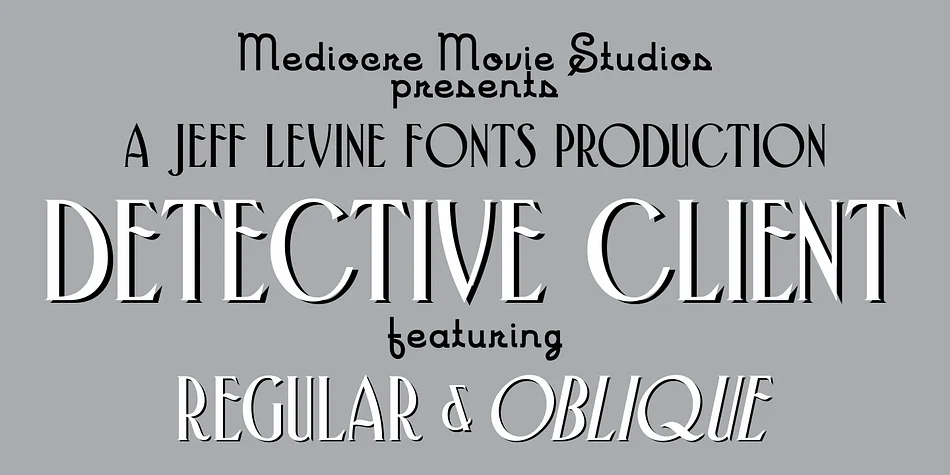
Detective Client JNL is a spurred serif font by Jeff Levine Fonts that draws inspiration from the hand-lettered elegance of 1940s film title cards. Those curved, organic serifs carry the warmth and sophistication of Art Nouveau design, a style that continues to feel relevant even decades later. This typeface balances formality with an unmistakable personality. It's not stern the way some serif typefaces can be, but instead presents a distinctive flair that feels intentional and measured.
This font shines for vintage-leaning projects that need real character and presence. Speakeasy signage, luxury wine labels, antique shop branding, and cover designs for mystery novels all become more compelling with this typeface. It works beautifully on wedding invitation suites, where couples want something with real personality that goes beyond what typical script fonts offer. Both regular and oblique versions give you flexibility to add emphasis or adjust the overall mood of a layout.
What sets Detective Client JNL apart is its restraint paired with personality. It won't work for everything, and that's actually the strength. When it's the right choice, a design immediately signals craft and considered intention. You can grab this from Creative Fabrica for any project that deserves real vintage character.
Style & Use Cases
- Overall Style
- Bold, Distinctive
- Use Case
- Headlines, Posters
- Ideal For
- logos, packaging, and standout titles
- Pairs With
- a neutral sans-serif
How to Install DETECTIVE CLIENT JNL Font
Step-by-step instructions for every platform
- 1Download the DETECTIVE CLIENT JNL font file (.ttf or .otf).
- 2Locate the downloaded file in your Downloads folder.
- 3Right-click the font file.
- 4Select "Install" to install for the current user, or "Install for all users" to make it available system-wide.
- 5DETECTIVE CLIENT JNL is now available in Word, Photoshop, Illustrator, and all other apps.
More by Jeff Levine Fonts
View all →



Browse fonts by theme
Curated collections →Saw a font in a picture? Identify any font from an image with our free Font Finder.
More Decorative Fonts
Browse all →







What pairs well with DETECTIVE CLIENT JNL Font?
DETECTIVE CLIENT JNL Font is a decorative font that shines as a display or heading face. Pair it with a clean sans-serif or serif font for body text — the contrast creates a clear hierarchy while the two styles stay balanced and easy to read.




DETECTIVE CLIENT JNL Font
Reviewed by the FontBoxDL team · Updated June 2026