
 1 / 8
1 / 8About Dental Machine Font
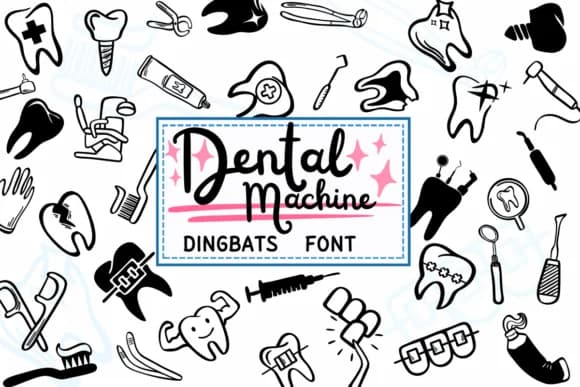
Imagine designing business cards and signage for a new dental practice, or creating branded materials for an orthodontist's office that needs visual personality. Dental Machine by PraewDesigns is a dingbats font where each character becomes a dental illustration instead of a standard letter.
This font handles orthodontist practice stationery, dental clinic appointment cards, patient education posters, and social media graphics announcing cleanings or treatment options. You get toothbrushes, teeth, braces, dental tools, and other oral care doodles, all rendered as individual characters. There's no need for clip art or icon libraries; simply type a character and the dental imagery appears. The illustrations are clean enough for professional work but charming enough to feel approachable and patient-friendly. It's the kind of font that tells patients you know your specific niche.
Dental Machine works best at large sizes, where each icon becomes clear and impactful. Use it for dental hygiene clinic signage, merchandise designs for a dental professional's side project, or educational materials about proper oral care. Strengthening brand identity for a busy dental practice or creating complementary marketing assets becomes easier when you have the right visual language. Pick it up on Creative Fabrica to start building your dental brand.
Style & Use Cases
- Overall Style
- Iconographic, Dental
- Use Case
- Icons, Accents
- Ideal For
- ornaments, bullets, and decorative flourishes
- Pairs With
- any text font
How to Install Dental Machine Font
Step-by-step instructions for every platform
- 1Download the Dental Machine font file (.ttf or .otf).
- 2Locate the downloaded file in your Downloads folder.
- 3Right-click the font file.
- 4Select "Install" to install for the current user, or "Install for all users" to make it available system-wide.
- 5Dental Machine is now available in Word, Photoshop, Illustrator, and all other apps.
More by PraewDesigns
View all →
Browse fonts by theme
Curated collections →Saw a font in a picture? Identify any font from an image with our free Font Finder.
More Dingbats Fonts
Browse all →







What pairs well with Dental Machine Font?
Dental Machine Font is a versatile dingbats font that works for both headings and body text. Pair it with a contrasting sans-serif or serif font to add visual interest and a clear distinction between titles and body copy.



Dental Machine Font
by PraewDesigns
Reviewed by the FontBoxDL team · Updated June 2026