
 1 / 9
1 / 9About Dattebayo Font
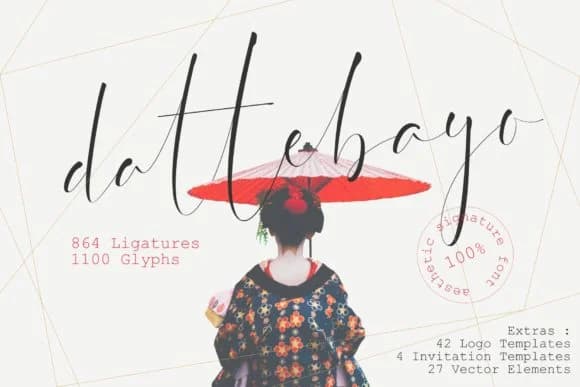
Dattebayo by VSTRD TYPEWORKS is a signature script with refined, delicate letterforms that convey understated sophistication. The font features extensive ligatures and stylistic alternates that allow for fluid, personalized compositions, making it particularly suited for projects where individual character matters. Whether designing custom wedding invitation suites, creating luxury product labels for artisanal brands, or crafting personalized thank-you cards, Dattebayo brings an element of refined elegance that feels both contemporary and timeless.
Beyond the typeface itself, this package delivers substantial bonus content to jumpstart your creative process. You'll find 42 pre-designed logo templates that demonstrate the font's versatility, four invitation layouts ready for customization, and 27 vector elements including decorative flourishes and design components. This combination of font and assets makes the resource especially valuable for independent designers and small business owners creating boutique packaging or establishing visual brand identity without starting from scratch.
The thin, intentional letterforms create visual interest through their own architecture rather than relying on weight or scale, allowing the font to perform equally well across intimate stationery designs and larger display applications. Whether you're building a signature look for a small online shop, designing elements for handcrafted product boxes, or creating custom event materials, Dattebayo provides both the typographic foundation and supporting assets to bring your vision to life. Find Dattebayo on Creative Fabrica and access the complete package today.
Style & Use Cases
- Overall Style
- Elegant, Flowing, Dattebayo
- Use Case
- Invitations, Branding
- Ideal For
- wedding stationery, greeting cards, and signatures
- Pairs With
- a simple uppercase sans
How to Install Dattebayo Font Font
Step-by-step instructions for every platform
- 1Download the Dattebayo Font font file (.ttf or .otf).
- 2Locate the downloaded file in your Downloads folder.
- 3Right-click the font file.
- 4Select "Install" to install for the current user, or "Install for all users" to make it available system-wide.
- 5Dattebayo Font is now available in Word, Photoshop, Illustrator, and all other apps.
More by VSTRD TYPEWORKS
View all →
More Script Handwritten Fonts
Browse all →







What pairs well with Dattebayo Font?
Dattebayo Font is a script font that shines as a display or heading face. Pair it with a clean sans-serif or serif font for body text — the contrast creates a clear hierarchy while the two styles stay balanced and easy to read.



Dattebayo Font
Reviewed by the FontBoxDL team · Updated May 2026