
 1 / 8
1 / 8About Cute Hat Font
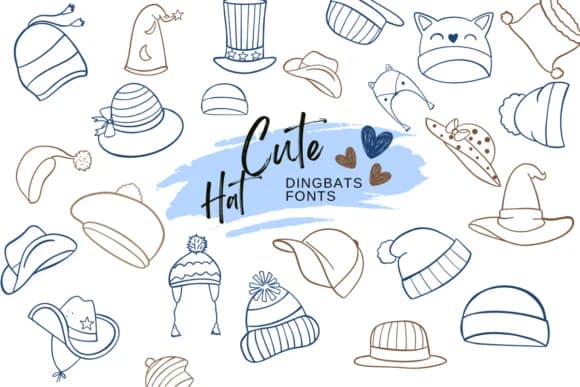
Instead of traditional letterforms, Cute Hat replaces alphabet characters with a curated collection of whimsical hat designs. Created by Suphitchaya, this dingbat font functions as a symbol set rather than a text typeface. Every keystroke produces a different hat illustration, spanning everything from festive winter caps to animal-themed headwear, giving you a full visual library within a single font file.
This approach makes Cute Hat an ideal fit for projects that need decorative symbols rather than text. Holiday greeting card designs benefit tremendously from having these ready-made hat illustrations instantly available. Children's book cover layouts, winter-themed social media graphics, and scrapbooking projects all draw on these icon elements to add character and visual interest without requiring separate illustration assets. The cartoon style and playful proportions also work particularly well for printable DIY craft templates, gift tag designs aimed at younger audiences, and festive seasonal branding.
The font functions across major design software including Affinity Designer, Affinity Photo, and Procreate, alongside standard font applications. Seasonal packaging designs, craft instruction patterns, and children's educational materials all benefit from this dingbat collection, which provides instant, cohesive hat imagery straight from your keyboard. Find Cute Hat on Creative Fabrica and integrate it into your next project.
Style & Use Cases
- Overall Style
- Iconographic, Fonts
- Use Case
- Icons, Accents
- Ideal For
- ornaments, bullets, and decorative flourishes
- Pairs With
- any text font
How to Install Cute Hat Font
Step-by-step instructions for every platform
- 1Download the Cute Hat font file (.ttf or .otf).
- 2Locate the downloaded file in your Downloads folder.
- 3Right-click the font file.
- 4Select "Install" to install for the current user, or "Install for all users" to make it available system-wide.
- 5Cute Hat is now available in Word, Photoshop, Illustrator, and all other apps.
More by Suphitchaya
View all →
Browse fonts by theme
Curated collections →Saw a font in a picture? Identify any font from an image with our free Font Finder.
More Dingbats Fonts
Browse all →







What pairs well with Cute Hat Font?
Cute Hat Font is a versatile dingbats font that works for both headings and body text. Pair it with a contrasting sans-serif or serif font to add visual interest and a clear distinction between titles and body copy.



Cute Hat Font
by Suphitchaya
Reviewed by the FontBoxDL team · Updated July 2026