
 1 / 8
1 / 8About Cute Fruit Font
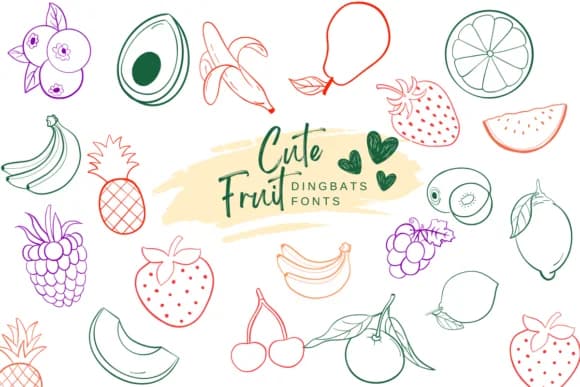
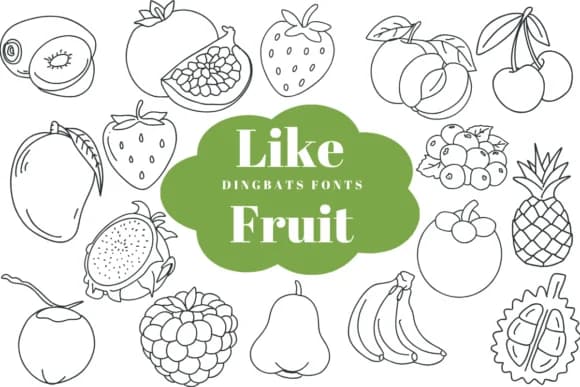
Imagine designing labels for artisan jam jars or creating stickers for a children's craft kit. Cute Fruit by Suphitchaya is a dingbat font that replaces letters with cheerful fruit illustrations, including apples, bananas, strawberries, watermelons, pears, and grapes. Each character is a finished vector illustration you can drop straight into your design, giving your work a handcrafted feel without spending hours drawing.
This font shines in any project where you need a playful visual language. You can use Cute Fruit for farmers market produce packaging, organic snack labels, DIY greeting cards, and illustrated sticker sheets. The outline versions let you experiment with custom color fills and layer effects, while the solid versions work beautifully as standalone graphics. It's available in both OTF and TTF formats, making it compatible across Procreate, Affinity Designer, Affinity Photo, and standard design software.
The real strength here is how versatile the outline style becomes once you start playing with it in your actual projects. You get vector-quality shapes that scale cleanly from small labels to large canvas prints without losing detail or clarity. Each fruit character holds its own as a graphic element, whether you're using one or filling an entire layout. Find Cute Fruit on Creative Fabrica and bring some fruit-shaped personality to your next design.
Style & Use Cases
- Overall Style
- Iconographic, Fonts
- Use Case
- Icons, Accents
- Ideal For
- ornaments, bullets, and decorative flourishes
- Pairs With
- any text font
How to Install Cute Fruit Font
Step-by-step instructions for every platform
- 1Download the Cute Fruit font file (.ttf or .otf).
- 2Locate the downloaded file in your Downloads folder.
- 3Right-click the font file.
- 4Select "Install" to install for the current user, or "Install for all users" to make it available system-wide.
- 5Cute Fruit is now available in Word, Photoshop, Illustrator, and all other apps.
More by Suphitchaya
View all →
Browse fonts by theme
Curated collections →Saw a font in a picture? Identify any font from an image with our free Font Finder.
More Dingbats Fonts
Browse all →







What pairs well with Cute Fruit Font?
Cute Fruit Font is a versatile dingbats font that works for both headings and body text. Pair it with a contrasting sans-serif or serif font to add visual interest and a clear distinction between titles and body copy.



Cute Fruit Font
by Suphitchaya
Reviewed by the FontBoxDL team · Updated July 2026