
 1 / 8
1 / 8About Cute Doodle Font
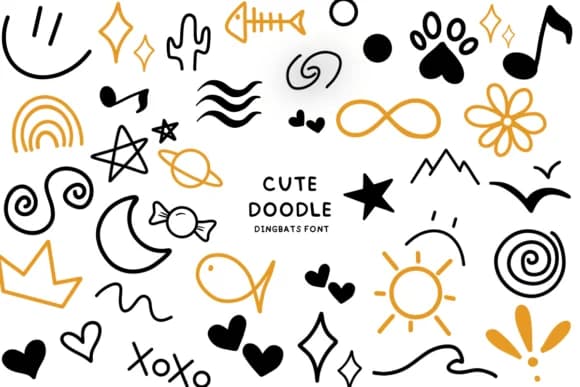
Bee piyanuch's Cute Doodle is a hand-drawn dingbats collection that trades polished geometry for genuine personality. Every icon (hearts, stars, rainbows, suns, and scattered flourishes) carries the warmth of sketched linework, making it feel more like a friend's margin doodles than a sterile symbol set.
This font shines where charm actually matters. Birthday party invitations benefit from icons that feel approachable rather than forced. Bullet journal spreads and Goodnotes pages come alive with its scattered decorative elements, while Canva social media templates gain character that generic symbol fonts simply cannot deliver. Procreate users pull it in for digital illustration overlays, and the sketched quality works beautifully for greeting card designs, scrapbooking layouts, and small-batch t-shirt graphics aimed at kids.
Designers working on children's products, educational materials, and planners will find this font does the heavy lifting without overwhelming the layout. The sketched style reads as intentional rather than accidental, which matters when you need icons that feel like they belong. Grab Cute Doodle from Creative Fabrica when you need icons that actually enhance your design rather than distract from it.
Style & Use Cases
- Overall Style
- Iconographic, Cute Fonts
- Use Case
- Icons, Accents
- Ideal For
- ornaments, bullets, and decorative flourishes
- Pairs With
- any text font
How to Install Cute Doodle Font
Step-by-step instructions for every platform
- 1Download the Cute Doodle font file (.ttf or .otf).
- 2Locate the downloaded file in your Downloads folder.
- 3Right-click the font file.
- 4Select "Install" to install for the current user, or "Install for all users" to make it available system-wide.
- 5Cute Doodle is now available in Word, Photoshop, Illustrator, and all other apps.
More by Bee piyanuch
View all →
Browse fonts by theme
Curated collections →Saw a font in a picture? Identify any font from an image with our free Font Finder.
More Dingbats Fonts
Browse all →







What pairs well with Cute Doodle Font?
Cute Doodle Font is a versatile dingbats font that works for both headings and body text. Pair it with a contrasting sans-serif or serif font to add visual interest and a clear distinction between titles and body copy.



Cute Doodle Font
by Bee piyanuch
Reviewed by the FontBoxDL team · Updated July 2026