
 1 / 5
1 / 5About Cursive Divider Font
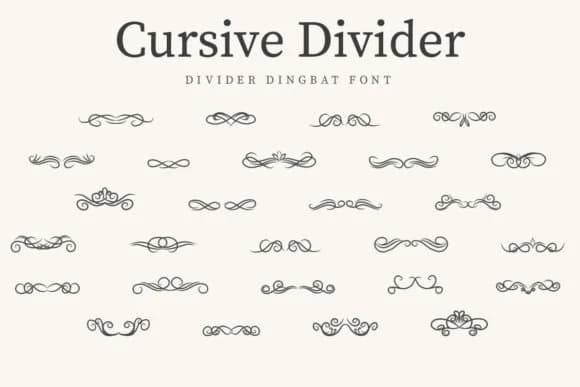
You're designing a vintage wedding invitation suite and need ornamental dividers that feel authentic without looking mass-produced. Cursive Divider from CraftedType Studio is a dingbat font built exactly for this work. It provides flourishes and decorative elements that scale beautifully, bringing that nostalgic, hand-crafted quality to invitations, vintage product labels, decorative menu cards, and handmade stationery.
The font works well when you need visual breaks between sections or period detail in your layouts. Each character carries real attention to ornamental work, so the dividers read as intentional flourishes rather than generic filler. Because it's a dingbat font, you can mix and match the available ornaments to create custom borders and arrangements that fit your design. The ornaments stay sharp at any scale, from small accents to poster-sized statements. Etsy shop owners and craft designers turn to this one because the vintage aesthetic makes their finished work feel intentional and polished.
Because this font works at any size, the complete character set holds its quality from small point sizes all the way up to poster scale. Whether you're using the ornaments as refined accents or building bolder compositions, the lines stay clean and readable. Get Cursive Divider on Creative Fabrica and start incorporating these vintage dividers into your next project.
Style & Use Cases
- Overall Style
- Iconographic, Cursive Divider
- Use Case
- Icons, Accents
- Ideal For
- ornaments, bullets, and decorative flourishes
- Pairs With
- any text font
How to Install Cursive Divider Font
Step-by-step instructions for every platform
- 1Download the Cursive Divider font file (.ttf or .otf).
- 2Locate the downloaded file in your Downloads folder.
- 3Right-click the font file.
- 4Select "Install" to install for the current user, or "Install for all users" to make it available system-wide.
- 5Cursive Divider is now available in Word, Photoshop, Illustrator, and all other apps.
More by CraftedType Studio
View all →



Browse fonts by theme
Curated collections →Saw a font in a picture? Identify any font from an image with our free Font Finder.
More Dingbats Fonts
Browse all →







What pairs well with Cursive Divider Font?
Cursive Divider Font is a versatile dingbats font that works for both headings and body text. Pair it with a contrasting sans-serif or serif font to add visual interest and a clear distinction between titles and body copy.



Cursive Divider Font
Reviewed by the FontBoxDL team · Updated July 2026