
 1 / 5
1 / 5About Coffe Divider Font
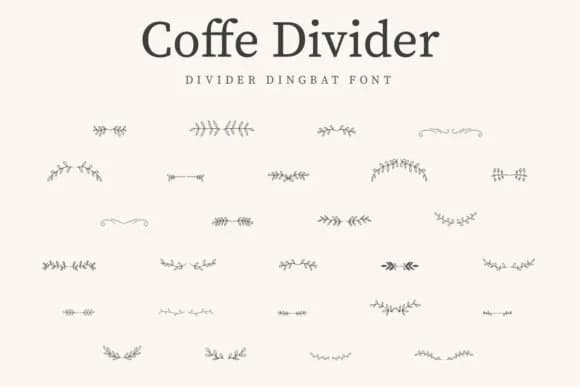
There's something inherently nostalgic about ornamental lettering that bridges decoration and function in equal measure. Coffe Divider from CraftedType Studio is a dingbat font built entirely from vintage floral elements: dividers, flourishes, ornamental separators, and decorative marks that work as real design components. Rather than just adorning layouts, these pieces solve a genuine problem, giving you intentional visual breathing room without resorting to generic rules or plain lines.
The practical applications are clear and immediate. Wedding invitation suites gain sophistication when bordered by these dividers instead of generic ornaments. Coffee shop menus benefit naturally from the thematic pairing (fitting, given the name). Scrapbooking pages come alive as section breaks or frame elements. Vintage-style journals transform when pages open to subtle floral separators. Greeting cards and handmade product labels also find real use here. What makes this font work beyond its nostalgic appeal is the restraint. The ornaments stay detailed enough to feel intentional, yet restrained enough not to overwhelm smaller compositions or crowd tight layouts. There's no filler, just purposeful marks.
Pair Coffe Divider with a clean, minimal sans-serif for body text, and you have a complete typographic system. Add this one to your collection on Creative Fabrica for that next vintage-minded project.
Style & Use Cases
- Overall Style
- Iconographic, Coffe Divider Font
- Use Case
- Icons, Accents
- Ideal For
- ornaments, bullets, and decorative flourishes
- Pairs With
- any text font
How to Install Coffe Divider Font
Step-by-step instructions for every platform
- 1Download the Coffe Divider font file (.ttf or .otf).
- 2Locate the downloaded file in your Downloads folder.
- 3Right-click the font file.
- 4Select "Install" to install for the current user, or "Install for all users" to make it available system-wide.
- 5Coffe Divider is now available in Word, Photoshop, Illustrator, and all other apps.
More by CraftedType Studio
View all →



Browse fonts by theme
Curated collections →Saw a font in a picture? Identify any font from an image with our free Font Finder.
More Dingbats Fonts
Browse all →







What pairs well with Coffe Divider Font?
Coffe Divider Font is a versatile dingbats font that works for both headings and body text. Pair it with a contrasting sans-serif or serif font to add visual interest and a clear distinction between titles and body copy.



Coffe Divider Font
Reviewed by the FontBoxDL team · Updated July 2026