
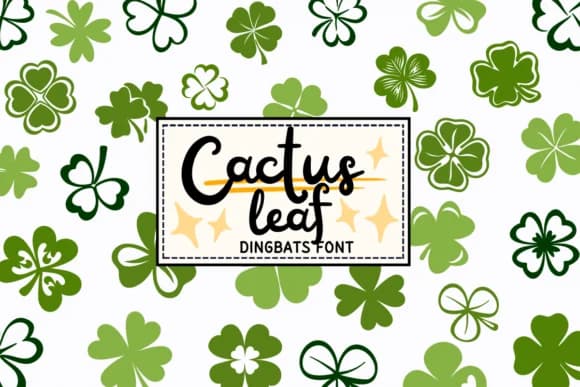
 1 / 8
1 / 8About Clover Leaf Font
You're setting up a St. Patrick's Day greeting card suite, and you want thematic leaf motifs that don't require hunting through clip art libraries or paying for licensed graphics. Clover Leaf, designed by PraewDesigns, is a pure dingbats font that replaces letters and numbers with an extensive assortment of clover and shamrock glyphs across multiple styles. Each keystroke becomes a different leaf illustration: thin outlines, bold solids, and intricately styled forms that stay crisp from card size to display-scale prints.
The vector-based construction makes this font particularly useful for craft projects demanding clean cuts and precision. Vinyl sticker cutters, laser-etching designs, and paper template work all benefit from the scalable lines that don't break down under pressure or heat. Use it for scrapbook borders, nature-themed wall decals, greeting card embellishments, and St. Patrick's seasonal decorations that need professional precision. Educational creators also rely on it for classroom posters and learning materials centered on botanical themes, growth, and good fortune.
Since every character renders as a clean vector shape, you can scale from tiny accent marks all the way to large display elements without losing fidelity. Find it on Creative Fabrica and start creating designs with leaf motifs and lucky symbols.
Style & Use Cases
- Overall Style
- Iconographic, Clover
- Use Case
- Icons, Accents
- Ideal For
- ornaments, bullets, and decorative flourishes
- Pairs With
- any text font
How to Install Clover Leaf Font
Step-by-step instructions for every platform
- 1Download the Clover Leaf font file (.ttf or .otf).
- 2Locate the downloaded file in your Downloads folder.
- 3Right-click the font file.
- 4Select "Install" to install for the current user, or "Install for all users" to make it available system-wide.
- 5Clover Leaf is now available in Word, Photoshop, Illustrator, and all other apps.
More by PraewDesigns
View all →
Browse fonts by theme
Curated collections →Saw a font in a picture? Identify any font from an image with our free Font Finder.
More Dingbats Fonts
Browse all →







What pairs well with Clover Leaf Font?
Clover Leaf Font is a versatile dingbats font that works for both headings and body text. Pair it with a contrasting sans-serif or serif font to add visual interest and a clear distinction between titles and body copy.



Clover Leaf Font
by PraewDesigns
Reviewed by the FontBoxDL team · Updated June 2026