
 1 / 5
1 / 5About Clamshell Divider Font
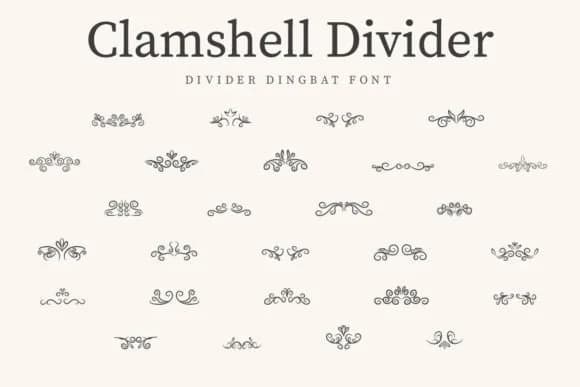
Clamshell Divider by CraftedType Studio is a vintage dingbat font built for decorative separators and ornamental flourishes. This typeface works particularly well for wedding invitation suites where you need elegant dividing elements, or for vintage-inspired scrapbooking layouts that call for period-accurate embellishments. Recipe cards, bookmark designs, and handmade stationery all benefit from its clean, classic style. The font's ornament characters give you plenty of options for breaking up text and adding visual interest without relying on heavy graphics.
What makes this font stand out is how restrained it feels. There's no oversaturation, no trying too hard. Each element feels intentional, designed to complement rather than overshadow your primary text. Use it for DIY craft projects, event programs, or anywhere you need that settled, vintage aesthetic that reads as refined rather than busy. You can layer these dividers with other typefaces to frame important text or create natural breathing room on a page.
If you're building designs with a timeless edge, Clamshell Divider works beautifully for boutique skincare labels, vintage-style menu cards, and personal stationery sets. It's the kind of font that makes handcrafted designs feel considered and polished. Grab it on Creative Fabrica and see how it transforms your next project.
Style & Use Cases
- Overall Style
- Iconographic, Clamshell Divider
- Use Case
- Icons, Accents
- Ideal For
- ornaments, bullets, and decorative flourishes
- Pairs With
- any text font
How to Install Clamshell Divider Font
Step-by-step instructions for every platform
- 1Download the Clamshell Divider font file (.ttf or .otf).
- 2Locate the downloaded file in your Downloads folder.
- 3Right-click the font file.
- 4Select "Install" to install for the current user, or "Install for all users" to make it available system-wide.
- 5Clamshell Divider is now available in Word, Photoshop, Illustrator, and all other apps.
More by CraftedType Studio
View all →



Browse fonts by theme
Curated collections →Saw a font in a picture? Identify any font from an image with our free Font Finder.
More Dingbats Fonts
Browse all →







What pairs well with Clamshell Divider Font?
Clamshell Divider Font is a versatile dingbats font that works for both headings and body text. Pair it with a contrasting sans-serif or serif font to add visual interest and a clear distinction between titles and body copy.



Clamshell Divider Font
Reviewed by the FontBoxDL team · Updated July 2026