
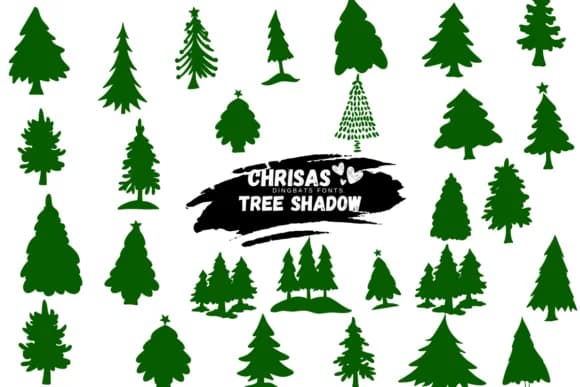
 1 / 8
1 / 8About Christmas Tree Shadow Font
You're laying out festive materials and need decorative elements that you can size, adjust, and repeat without hunting for illustrations or clip art. Christmas Tree Shadow, created by Suphitchaya, is a dingbats font that delivers hand-drawn tree shapes, ornamental shadows, and seasonal flourishes all as scalable characters ready to use.
This collection works well in holiday greeting card suites, DIY advent calendar layouts, sticker sheets for gift tags, and seasonal packaging labels. Each shape carries personality and warmth through the doodle-cartoon style rather than reading stiff or corporate, which matters when genuine character in design is the goal. Scale isn't a constraint: crisp, clear outlines stay readable from small accent details to large focal points.
It comes in both OTF and TTF formats, ensuring smooth integration with Procreate, Affinity Designer, and traditional design software like Illustrator. Working with dingbats gives you expandable, scalable vector shapes instead of flat static images, which means you save on file size while gaining real flexibility for tweaking, repositioning, or resizing layouts. The outlined construction means each piece maintains crispness even when scaled for large display sizes or small printed details. Get Christmas Tree Shadow on Creative Fabrica and add it to your holiday toolkit.
Style & Use Cases
- Overall Style
- Iconographic, Fonts
- Use Case
- Icons, Accents
- Ideal For
- ornaments, bullets, and decorative flourishes
- Pairs With
- any text font
How to Install Christmas Tree Shadow Font
Step-by-step instructions for every platform
- 1Download the Christmas Tree Shadow font file (.ttf or .otf).
- 2Locate the downloaded file in your Downloads folder.
- 3Right-click the font file.
- 4Select "Install" to install for the current user, or "Install for all users" to make it available system-wide.
- 5Christmas Tree Shadow is now available in Word, Photoshop, Illustrator, and all other apps.
More by Suphitchaya
View all →
Browse fonts by theme
Curated collections →Saw a font in a picture? Identify any font from an image with our free Font Finder.
More Dingbats Fonts
Browse all →







What pairs well with Christmas Tree Shadow Font?
Christmas Tree Shadow Font is a versatile dingbats font that works for both headings and body text. Pair it with a contrasting sans-serif or serif font to add visual interest and a clear distinction between titles and body copy.



Christmas Tree Shadow Font
by Suphitchaya
Reviewed by the FontBoxDL team · Updated July 2026