 Firefox
 1 / 3
1 / 3Loading font…
About Canting Font
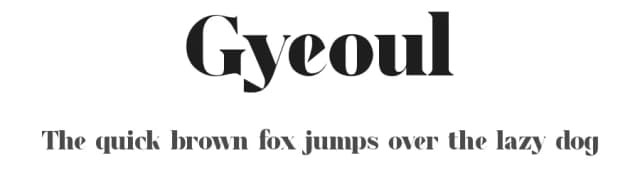
You're creating a luxury wedding invitation suite, carefully arranging typeface samples on your desk and really trying to nail the perfect tone with precision. Canting, designed by Omotu Studio in 2019, is the serif typeface that immediately stands out for this kind of work. It brings refined character to editorial layouts, book covers, and premium branding projects that need real tradition without austerity or coldness.
This serif performs well across specific use cases: wedding invitation suites with coordinated stationery, restaurant menu typography, small-batch artisan packaging for boutique brands, and international publishing where language coverage matters. The regular weight consistently maintains legibility across sizes, and its support for 104+ Latin-based languages means you can deploy it confidently in multilingual campaigns and global brand systems. It reads as both grounded and sophisticated, the sort of typeface that quietly builds trust through measured restraint rather than decoration. You'll find it works especially well in print contexts where readers linger over details.
When setting Canting at large display sizes, you'll want to open up the letter spacing generously so the forms have room to settle and breathe, commanding full attention. Try the free demo for personal work, or license the full commercial version on Creative Fabrica.
Style & Use Cases
- Overall Style
- Classic, Refined, Serif
- Use Case
- Editorial, Print
- Ideal For
- book covers, long-form text, and traditional branding
- Pairs With
- a clean sans-serif for captions
Canting Specifications
| Font Family | Canting Regular_DEMO |
| Style | Regular |
| Full Name | Canting Regular_DEMO |
| Version | 1.00 |
| Weight | 400 (Regular) |
| Glyph Count | 96 glyphs |
| PostScript Name | CantingRegular_DEMO |
| Designer | Omotu Studio 2019 |
| Format | TTF (TrueType) |
| File Size | 18.7 KB |
Languages Supported
Canting supports 104 languages.
How to Install Canting Font
Step-by-step instructions for every platform
- 1Download the Canting font file (.ttf or .otf).
- 2Locate the downloaded file in your Downloads folder.
- 3Right-click the font file.
- 4Select "Install" to install for the current user, or "Install for all users" to make it available system-wide.
- 5Canting is now available in Word, Photoshop, Illustrator, and all other apps.
Browse fonts by theme
Curated collections →Saw a font in a picture? Identify any font from an image with our free Font Finder.
More Serif Fonts
Browse all →


What pairs well with Canting Font?
Canting Font is a versatile serif font that works for both headings and body text. Pair it with a contrasting sans-serif or slab serif font to add visual interest and a clear distinction between titles and body copy.



Canting Font
Reviewed by the FontBoxDL team · Updated September 2026